# Emergency Response Simulator (ERS)

<figure><img src="/files/JiyWgY4ufQV6wKlbGxJL" alt=""><figcaption><p>Sonoran CAD x ERS</p></figcaption></figure>

## What is Emergency Response Simulator?

Emergency Response Simulator is a paid, third-party script for FiveM.

This advanced (co-op) PVE roleplay game mode simulates emergency service calls, where you as emergency service worker have to respond to. Whether you are a medic, firefighter, tow service operator or police officer, there is always something to do. With finetuned callouts you’ll never get bored of driving around in your service vehicle. Rush to high-priority, dangerous calls, or handle routine tasks like warning a speeder. Each callout is unique, with random outcomes that keep you curious and engaged every time you respond to an emergency.

[ERS can be purchased from Nights Software.](https://store.nights-software.com/category/ersgamemode)

## Activation Guide

### 1. Download and Install the Resource

{% hint style="info" %}
This submodule is already **enabled by default** when installing the [Sonoran CAD FiveM resource](/cad/integration-plugins/in-game-integration/fivem-installation.md).
{% endhint %}

### 2. Adjust the Configuration

The CAD display settings are stored inside of the `/configuration/ersintegration_config.lua` file.

### 3. Ensure Players are Linked

Ensure the players have already [linked their CAD](/cad/integration-plugins/in-game-integration/link-user-in-game.md) for this integration to work.

### 3. Update CAD Record Templates

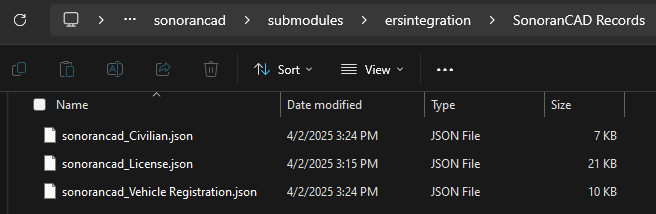
The ERS submodule comes with three record templates (character, license and vehicle registration).

Importing and using these record templates will ensure ERS callout character, license, and vehicle registration records are automatically generated.

These records can be located in the `/sonorancad/submodules/ersintegration/SonoranCAD Records` directory.

<figure><img src="/files/xivwUI7WGO0ltzPX0qS2" alt="" width="328"><figcaption><p>ERS Integration - SonoranCAD Custom Records</p></figcaption></figure>

{% hint style="info" %}
The `Civilian` and `Vehicle Registration` are default records. If you've modified them, it's recommended to replace them with the provided versions to ensure proper data import.
{% endhint %}

To import in Sonoran CAD, navigate to `Admin -> Customization -> Custom Records -> Import`.\
Open each JSON file and copy/paste the contents into the CAD.
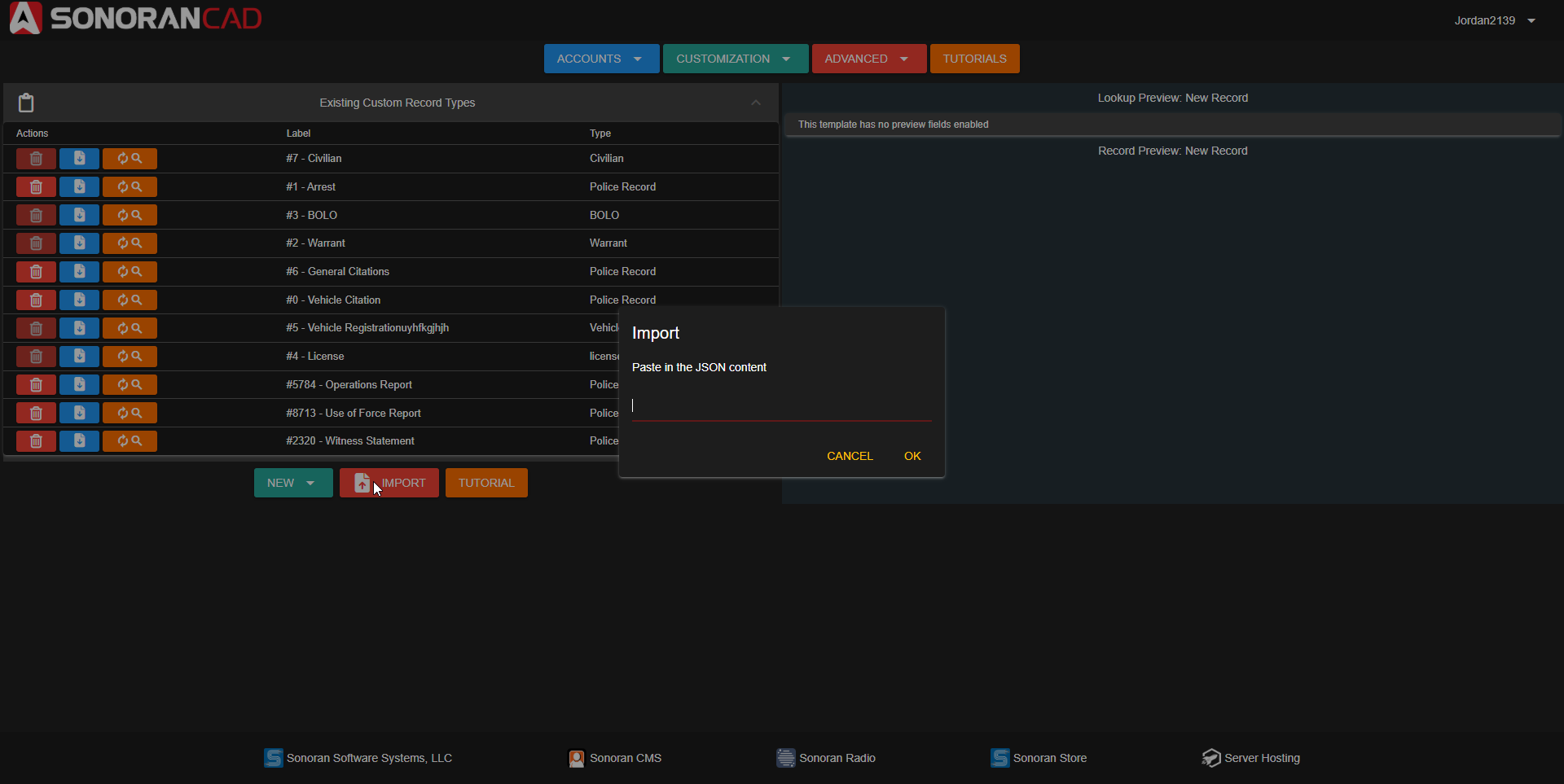
<figure><img src="/files/CvcDDrgQSjS7uyrrFThZ" alt="" width="375"><figcaption><p>Sonoran CAD - Import Record</p></figcaption></figure>

## Configuration

ERS Integration is highly configurable to allow for custom records and calls. All default configuration will work with the provided CAD records seamlessly. It is only recommended to edit if you are experienced with [custom records](/cad/tutorials/customization/creating-custom-record-and-report-types.md).

### Default Configuration

<details>

<summary>ersintegration_config.lua</summary>

```lua
--[[
    Sonoran Plugins

    Plugin Configuration

    Put all needed configuration in this file.
]]
local config = {
    enabled = false,
    pluginName = "ersintegration", -- name your plugin here
    pluginAuthor = "SonoranCAD", -- author
    configVersion = "1.2",
    -- put your configuration options below
    DOBFormat = "en", -- Make sure this matches | en: dd/mm/yyyy | us: mm/dd/yyyy | iso: yyyy/mm/dd
    clearRecordsAfter = 30, -- Clear records after this many minutes (0 = never)
    create911Call = true, -- Create a 911 call when an ERS callout is created
    createEmergencyCall = true, -- Create an emergency call when an ERS callout is accepted
    callPriority = 2, -- Priority of the call created in CAD (1-3) | Only used if createEmergencyCall is true
    callCodes = {
        ['Stolen_motorbike'] = '10-22'
    }, -- Call codes for each ERS callout type | Only used if createEmergencyCall is true
    autoAddCall = true, -- Automatically add members to the call when an ERS callout is accepted
    customRecords = {
        civilianRecordID = 7, -- Record ID for civilian records
        civilianValues = {
            -- Configurable mapping for SonoranCAD replaceValues.
            -- The key is what SonoranCAD expects and the value is either:
            --    • A string that matches a key in pedData, or
            --    • A function that returns a value based on pedData.
            --    • Left side of mapping is the SonoranCAD field mapping ID from Custom Records, right side is the ERS field.
            ["first"] = "FirstName",
            ["last"] = "LastName",
            ["dob"] = "DOB",
            ["age"] = function(pedData)
                return returnAgeFromDobString(pedData.DOB)
            end,
            ["sex"] = "Gender",
            ["residence"] = "Address",
            ["zip"] = "PostalCode",
            ["phone"] = "Phone",
            ["skin"] = "Nationality",
            ["img"] = "ProfilePicture"
            -- Add more keys as needed:
            -- email = "Email"  -- Example: if pedData.Email exists.
        },
        vehicleRegistrationRecordID = 5, -- Record ID for vehicle registration records
        vehicleRegistrationValues = {
            -- Configurable mapping for SonoranCAD replaceValues.
            -- The key is what SonoranCAD expects and the value is either:
            --    • A string that matches a key in pedData, or
            --    • A function that returns a value based on pedData.
            --    • Left side of mapping is the SonoranCAD field mapping ID from Custom Records, right side is the ERS field.
            -- Registration Information
            ["status"] = function(vehicleData)
                if vehicleData.stolen then
                    return "STOLEN"
                elseif not vehicleData.mot then
                    return "EXPIRED"
                else
                    return "VALID"
                end
            end,
            ["_wsakvwigt"] = function(vehicleData)
                if vehicleData.stolen then
                    return "STOLEN"
                elseif not vehicleData.mot then
                    return "EXPIRED"
                else
                    return "VALID"
                end
            end,
            ["_imtoih149"] = function(vehicleData)
                return os.date("%m/%d/%Y", os.time() + (60 * 60 * 24 * 365)) -- +1 year from now
            end,
            -- Civilian Information
            ["first"] = function(vehicleData)
                return vehicleData.owner_name:match("^(%S+)")
            end,
            ["last"] = function(vehicleData)
                return vehicleData.owner_name:match("%s(.+)$")
            end,
            -- Vehicle Information
            ["plate"] = "license_plate",
            ["model"] = "model",
            ["color"] = function(vehicleData)
                if vehicleData.color_secondary and vehicleData.color_secondary ~= "" then
                    return vehicleData.color .. ", " .. vehicleData.color_secondary
                else
                    return vehicleData.color
                end
            end,
            ["year"] = "build_year",
            ["type"] = function(vehicleData)
                local classMap = {
                    [0] = "SEDAN", [1] = "SEDAN", [2] = "SUV", [3] = "SUV",
                    [4] = "COUPE", [5] = "COUPE", [6] = "OFFROAD", [7] = "TRUCK",
                    [8] = "MOTORCYCLE", [9] = "MARINE", [16] = "AIRCRAFT"
                }
                return classMap[vehicleData.vehicle_class] or "SEDAN"
            end,
        -- Add more keys as needed:
        -- owner = "Owner"  -- Example: if pedData.Owner exists.
        },
        licenseRecordId = 4, -- Record ID for license records
        licenseTypeField = "7eddab31daf4a0182", -- Field ID for license type
        licenseTypeConfigs = {
            DRIVER = {
                type = "DRIVER",
                is_valid = "License_Car_Is_Valid",
                license = "License_Car",
            },
            MOTORCYCLE = {
                type = "MOTORCYCLE",
                is_valid = "License_Bike_Is_Valid",
                license = "License_Bike",
            },
            BOAT = {
                type = "BOAT",
                is_valid = "License_Boat_Is_Valid",
                license = "License_Boat",
            },
            PILOT = {
                type = "PILOT",
                is_valid = "License_Pilot_Is_Valid",
                license = "License_Pilot",
            },
            CDL = {
                type = "CDL",
                is_valid = "License_Truck_Is_Valid",
                license = "License_Truck",
            },
        },
        licenseRecordValues = {
            -- License Information
            ["252c4250da9421cbd"] = function(pedData, ctx)
                return pedData[ctx.is_valid] and "VALID" or "SUSPENDED"
            end,
            ["878766af4964853a7"] = function(pedData, ctx)
                return pedData[ctx.is_valid] and "VALID" or "EXPIRED"
            end,
            ["_54iz1scv7"] = function(pedData, ctx)
                if pedData[ctx.license] == "Expired" then
                    return os.date("%m/%d/%Y", os.time() - (60 * 60 * 24 * math.random(1, 365))) -- Within the last year
                end

                return os.date("%m/%d/%Y", os.time() + (60 * 60 * 24 * math.random(1, 365))) -- Within a year
            end,
            -- Civilian Information
            ["first"] = "FirstName",
            ["last"] = "LastName",
            ["mi"] = "", -- No M.I. mapped
            ["dob"] = "DOB",
            ["age"] = function(pedData)
                return returnAgeFromDobString(pedData.DOB)
            end,
            ["sex"] = "Gender",
            ["residence"] = "Address",
            ["zip"] = "PostalCode",
        },
        boloRecordID = 3, -- Record ID for BOLO records
        boloRecordValues = {
            ['_olgxdruc3'] = 'bolo_description'
        },
        warrantRecordID = 2, -- Record ID for warrant records
        warrantDescription = '_avb6wvgyi', -- Field ID for warrant description
        warrantFlags = '_hlshajq0f' -- Field ID for warrant flags
    }

}

if config.enabled then Config.RegisterPluginConfig(config.pluginName, config) end

function returnAgeFromDobString(dobString)
    local day, month, year

    if config.DOBFormat == "en" then -- dd/mm/yyyy
        day = tonumber(dobString:sub(1,2))
        month = tonumber(dobString:sub(4,5))
        year = tonumber(dobString:sub(7,10))

    elseif config.DOBFormat == "us" then -- mm/dd/yyyy
        month = tonumber(dobString:sub(1,2))
        day = tonumber(dobString:sub(4,5))
        year = tonumber(dobString:sub(7,10))

    elseif config.DOBFormat == "iso" then -- yyyy/mm/dd
        year = tonumber(dobString:sub(1,4))
        month = tonumber(dobString:sub(6,7))
        day = tonumber(dobString:sub(9,10))
    else
        errorLog("Unsupported DOB format: " .. tostring(config.DOBFormat))
    end

    local today = os.date("*t")
    local age = today.year - year

    if today.month < month or (today.month == month and today.day < day) then
        age = age - 1
    end

    return tostring(age)
end

```

</details>

### Configuration Values

<details>

<summary>Default Configuration Values</summary>

<table><thead><tr><th>Value</th><th width="113">Type</th><th>Description</th></tr></thead><tbody><tr><td><code>DOBFormat</code></td><td><code>string</code></td><td>Language code for the DOB format. Available options can be found in the configuration file</td></tr><tr><td><code>clearRecordsAfter</code></td><td><code>integer</code></td><td>Number of minutes to clear records after | 0 to never delete</td></tr><tr><td><code>create911Call</code></td><td><code>bool</code></td><td>Create a 911 call when an ERS callout is created</td></tr><tr><td><code>createEmergencyCall</code></td><td><code>bool</code></td><td>Create an emergency call when an ERS callout is accepted</td></tr><tr><td><code>callPriority</code></td><td><code>integer</code></td><td>Priority of the call created in CAD (1-3)</td></tr><tr><td><code>callCodes</code></td><td><code>array</code></td><td>Call codes for each ERS callout type. | Left side is the callout ID and right side is the corresponding 10 code</td></tr><tr><td><code>autoAddCall</code></td><td><code>bool</code></td><td>Automatically add members to the call when an ERS callout is accepted</td></tr><tr><td><code>customRecords</code></td><td><code>array</code></td><td>Array of record customization for CAD records. Please see comments in file for more information on record customization</td></tr></tbody></table>

</details>

## Features

### Live Map Callout Generation

Dispatchers can use the live map to create a new ERS callout at a specific location.

Drag-and-drop the `ERS` icon from the toolbar to a location on the map. Clicking the new ERS map icon will allow you customize the callout and settings.
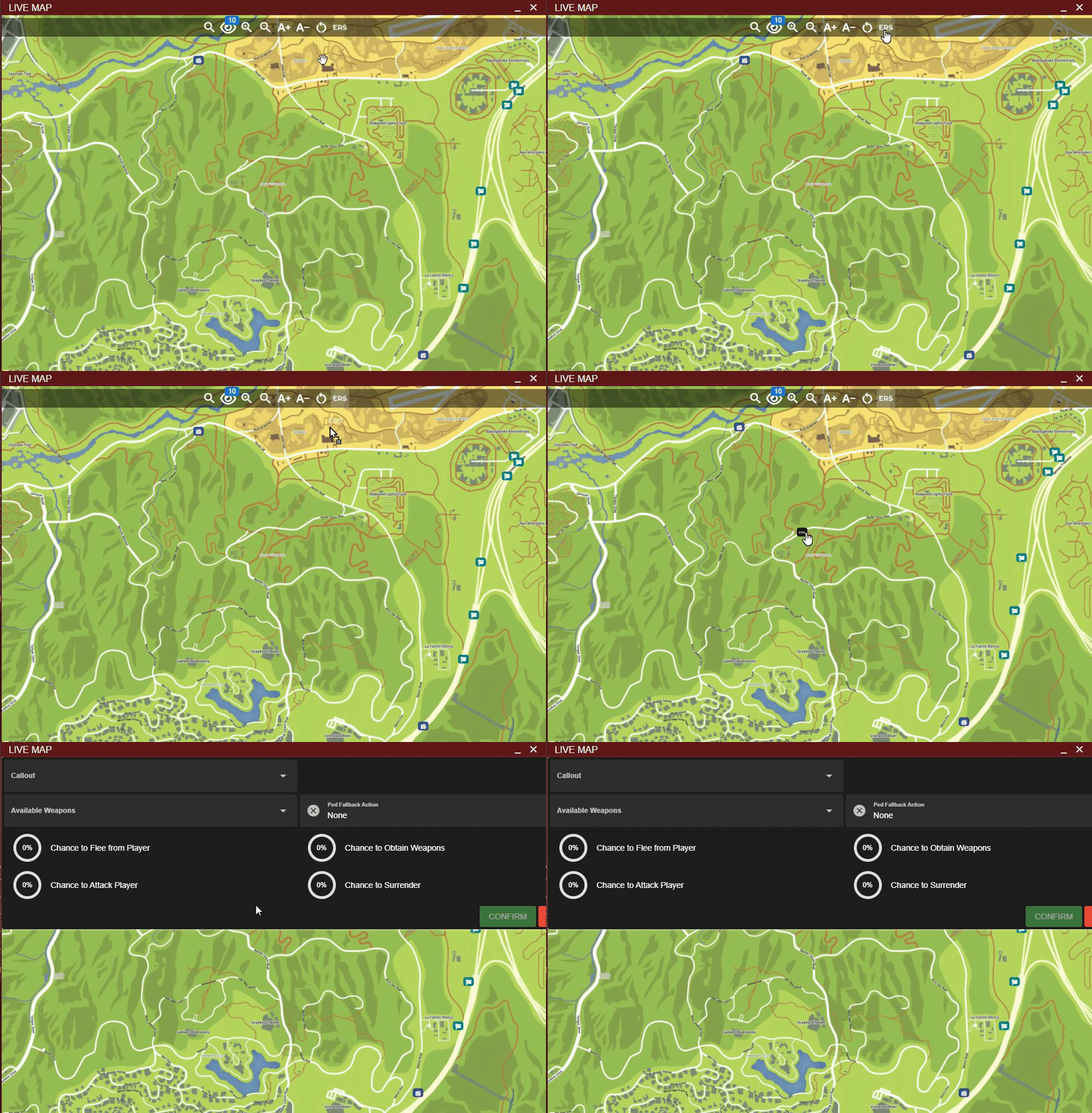
<figure><img src="/files/ggwYi3pxJjnQ45jfaVOe" alt="" width="375"><figcaption><p>Sonoran CAD: ERS Callout Creation</p></figcaption></figure>

### Record Lookups

When a callout is first interacted with, character, license, and vehicle records will be generated in the CAD with the information.

This allows lookups in the CAD to be ran.

### Automatic Call Generation

* When a callout is generated in-game, a 911 call will be automatically created in the CAD.
  * 911 calls generated from a callout will display with location on the live map.
* When a callout is accepted by a unit:
  * A dispatch call is automatically generated.
  * The unit is automatically attached to the CAD dispatch call.

## Limitations

### Database Sync

When a community uses database sync, all record lookups run against that community’s external database. The ERS integration automatically creates characters and vehicles in the CAD database through the API, so these records must be included alongside the external database results.

To enable this, turn on [**Include CAD API records in DB Sync lookups**](/cad/integration-plugins/database-sync-and-merge/database-sync-credentials.md#combine-api-and-db-sync-records).


---

# Agent Instructions: Querying This Documentation

If you need additional information that is not directly available in this page, you can query the documentation dynamically by asking a question.

Perform an HTTP GET request on the current page URL with the `ask` query parameter:

```
GET https://docs.sonoransoftware.com/cad/integration-plugins/in-game-integration/available-plugins/ers.md?ask=<question>
```

The question should be specific, self-contained, and written in natural language.
The response will contain a direct answer to the question and relevant excerpts and sources from the documentation.

Use this mechanism when the answer is not explicitly present in the current page, you need clarification or additional context, or you want to retrieve related documentation sections.