# VehReg

{% hint style="warning" %}
This submodule utilizes API endpoints that require the **plus** version of Sonoran CAD or higher. For more information, view our [pricing ](https://docs.sonoransoftware.com/cad/pricing/faq)page.
{% endhint %}

{% hint style="success" %}
Looking for VPS, web, or dedicated hosting? Check out our official [server hosting](https://docs.sonoransoftware.com/cad/integration-plugins/in-game-integration/fivem-installation/available-plugins/broken-reference)!
{% endhint %}

## Activation Guide

### 1. Download and Install the Core

If you haven't already, be sure to install and configure the [SonoranCAD Core](https://docs.sonoransoftware.com/cad/integration-plugins/in-game-integration/fivem-installation) first.

### 2. Activate the Submodule and all Dependencies

Follow the [submodule activation guide](https://docs.sonoransoftware.com/cad/integration-plugins/in-game-integration/submodule-configuration#activating-a-submodule) for the required submodules.

### 3. Configure Custom Record Fields

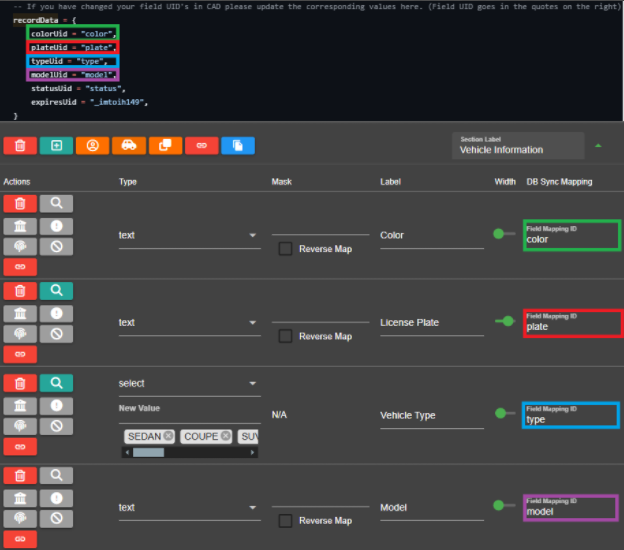
When a player registers a vehicle in-game, the submodule must know what fields in your custom vehicle registration to enter the vehicle information into. The `recordData` portion of the config contains the `Field Mapping ID` for the default vehicle record template.

Custom record templates are found in `Admin` > `Customization` > `Custom Records`

If you have modified the [vehicle registration template](https://docs.sonoransoftware.com/cad/tutorials/customization/creating-custom-record-and-report-types), update the `recordData` configuration accordingly.

<figure><img src="https://232668649-files.gitbook.io/~/files/v0/b/gitbook-x-prod.appspot.com/o/spaces%2F-M4pGN81fb4R6zFhodcu%2Fuploads%2FdFI4Kh8tOmRRi8eoa4kB%2Fimage.png?alt=media&#x26;token=282ead3e-0c9a-4b50-825c-1ab056210416" alt=""><figcaption><p>Vehreg: Custom Record Field Mapping</p></figcaption></figure>

### 4. Additional Configuration&#x20;

<table><thead><tr><th>Option</th><th width="276">Description</th><th width="351">Default</th></tr></thead><tbody><tr><td>reigsterCommand</td><td>The command used to register current vehicle</td><td>reg</td></tr><tr><td>defaultRegExpire</td><td>The default date that all registrations will expire</td><td>01/02/2030</td></tr><tr><td>defaultRegStatus</td><td>The default status that all registrations will have | MUST BE IN CAPS</td><td>VALID</td></tr><tr><td>language</td><td>Array of language used within the script</td><td>English</td></tr><tr><td>recordData</td><td>Array of field UID's based on your vehicle registration record</td><td>Default from CAD</td></tr><tr><td>customData</td><td>Array of preset vehicle information, commonly used for addon vehicles where names may not be present </td><td><pre class="language-lua"><code class="lang-lua">customData = {
    {
        spawncode = "adder",
        model = "Adder",
    },
    {
        spawncode = "blista",
        model = "Blista",
    }
}
</code></pre></td></tr></tbody></table>

## Usage

### Commands

| reg | Register your current vehicle in CAD |
| --- | ------------------------------------ |

## Developer Documentation

You can now implement our vehicle registration system into your own scripts by simply calling a server event! See our [Server Events documentation](https://docs.sonoransoftware.com/cad/integration-plugins/framework-development-documentation/server-events#sonorancad-registervehicle) for usage.
