

# Configuring Multiple Servers

{% hint style="info" %}
The free version of Sonoran CAD is limited to one (1) server.\
For more information, see our [pricing](https://docs.sonoransoftware.com/cad/pricing/faq) or view how to check your community [limits](https://docs.sonoransoftware.com/cad/tutorials/getting-started/view-your-limits).
{% endhint %}

### Configuring An Additional Server

In the Admin Customization menu, expand the "Servers" section to add, edit, or remove additional servers in your CAD.
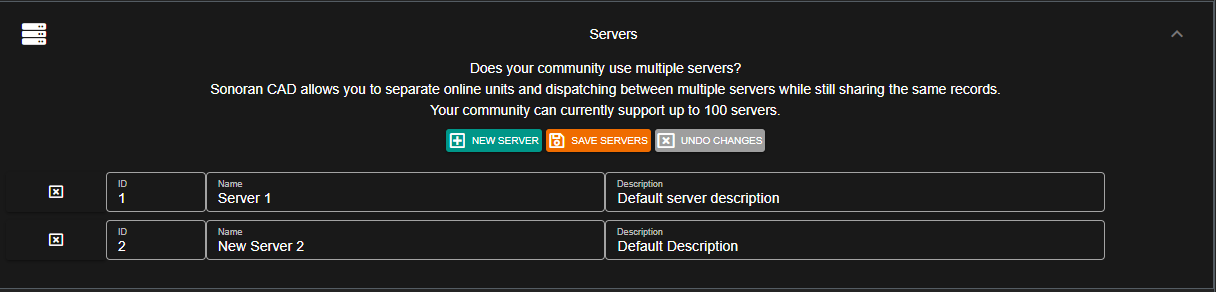
![Additional servers are configured in the customization menu](https://232668649-files.gitbook.io/~/files/v0/b/gitbook-legacy-files/o/assets%2F-M4pGN81fb4R6zFhodcu%2F-M4paUCVvEccUY19bdwv%2F-M4pbtr6GjKtXoHqy5xp%2Fservers.PNG?alt=media\&token=23340e77-fd92-4270-9ce2-0e86c392d235)

### Changing Servers in the CAD

#### Civilian Page

In the civilian page, the top right header allows users to swap back and forth between servers.

![Users can select their server in the top header](https://232668649-files.gitbook.io/~/files/v0/b/gitbook-x-prod.appspot.com/o/spaces%2F-M4pGN81fb4R6zFhodcu%2Fuploads%2FyWNDUpHyggmkOTyKSGKT%2Fimage.png?alt=media\&token=f564aa04-43c2-40a5-bde9-c6c32613f4d4)

#### Emergency Pages

In the police, fire, EMS, and dispatch pages; users can select their server by clicking on the start menu.
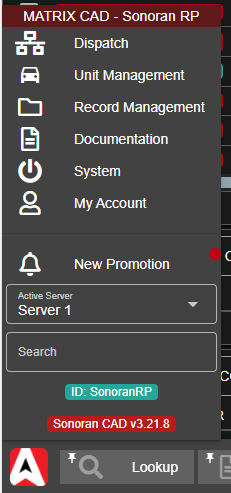
![Emergency Pages - Server Selector](https://232668649-files.gitbook.io/~/files/v0/b/gitbook-x-prod.appspot.com/o/spaces%2F-M4pGN81fb4R6zFhodcu%2Fuploads%2FTahfWh0qjXlh3RyAR0kn%2Fimage.png?alt=media\&token=1a38d593-37f7-4a31-a9b0-c7e5a00b481a)
