

# Custom Emails

{% hint style="warning" %}
NOTE: If you have not already, you will need to configure your [custom login page](https://docs.sonoransoftware.com/cad/tutorials/customization/custom-login-page).
{% endhint %}

{% hint style="info" %}
Community customizations is not enabled with the free version of Sonoran CAD.\
For more information, see our [pricing](https://docs.sonoransoftware.com/cad/pricing/faq) or view how to check your community [limits](https://docs.sonoransoftware.com/cad/tutorials/getting-started/view-your-limits).
{% endhint %}

#### 1. Configure Your Emails

In the admin customization menu, expand the "Custom Community Emails" section.\
Here, you can set the email header, sub-header, and body text.\
\
\&#xNAN;*NOTE:* Your community logo will automatically be inserted into all emails.
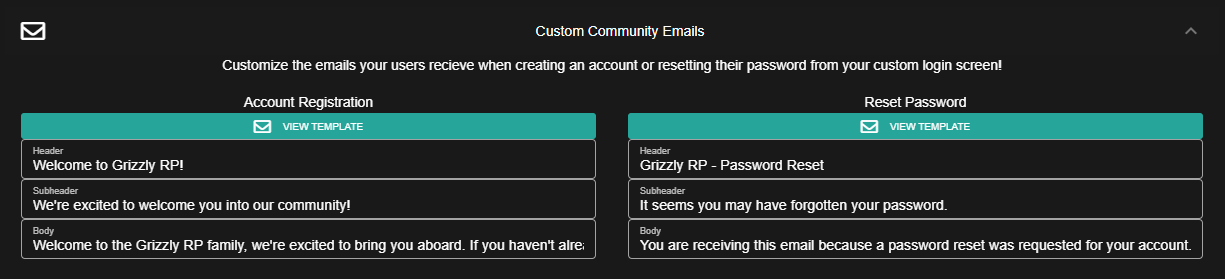
![The email customization panel allows you to enter your own text](https://232668649-files.gitbook.io/~/files/v0/b/gitbook-legacy-files/o/assets%2F-M4pGN81fb4R6zFhodcu%2F-M4px2aYFCyx9Ms6Dio7%2F-M4pxLpuYoXyqOtjq9DX%2Femailconfig.PNG?alt=media\&token=837f8ba5-f214-4421-b697-7953706f01be)

#### 2. Save and Enjoy!

Once saved, all user account registration and password recovery emails sent from your custom login page will be customized as configured.
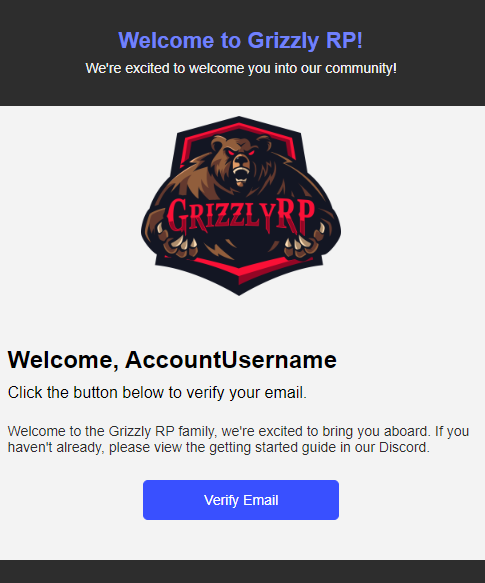
![Custom emails are sent to users as configured](https://232668649-files.gitbook.io/~/files/v0/b/gitbook-legacy-files/o/assets%2F-M4pGN81fb4R6zFhodcu%2F-M4px2aYFCyx9Ms6Dio7%2F-M4pycOoI12gq1fG1t05%2FemailExample.PNG?alt=media\&token=4133a878-e699-4966-bf1f-5ac89a66006e)
