# API ID System

## Changing Your Global Account's API ID Settings

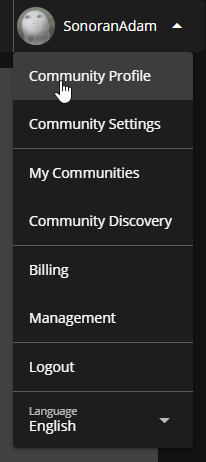
### 1. Navigate to Account Profile

Select `Community Profile` in the dropdown below your username.

![Sonoran CMS - Top Left Drop-Down](https://3006847189-files.gitbook.io/~/files/v0/b/gitbook-x-prod.appspot.com/o/spaces%2F-MdBOa9OFjtdqw9FdXli%2Fuploads%2Fgit-blob-e58bd9aac728878438f38d43b3194d49ee74711b%2FCMS_CommProfileSelect.png?alt=media)

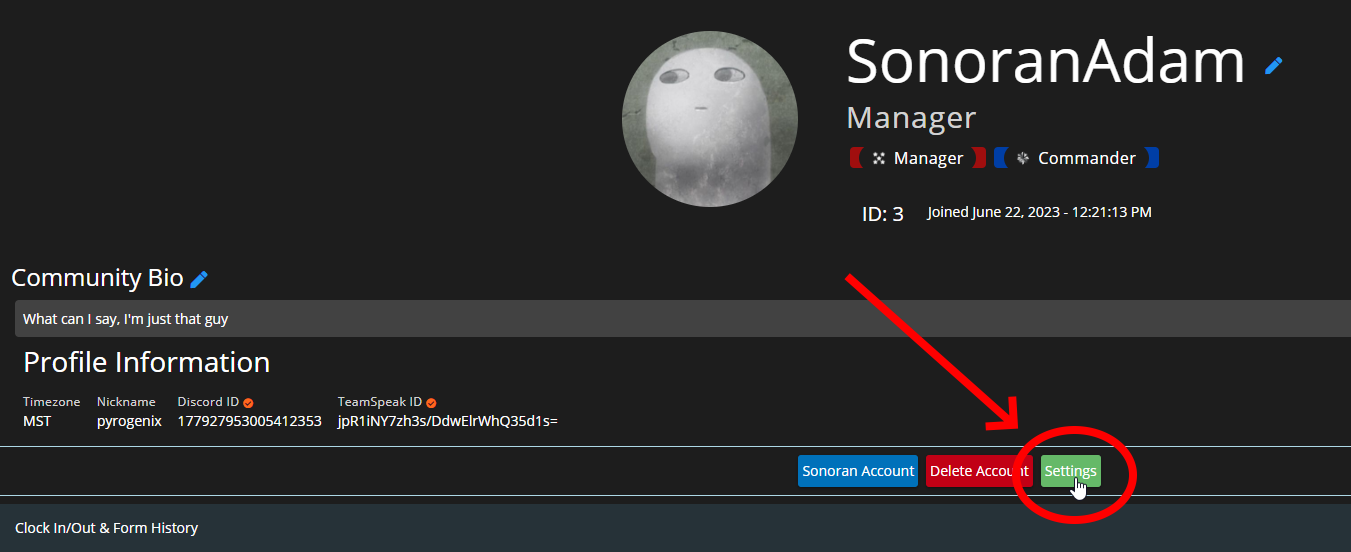
### 2. Open API ID Settings

Click `Settings` under profile view

![Sonoran CMS - Profile View](https://3006847189-files.gitbook.io/~/files/v0/b/gitbook-x-prod.appspot.com/o/spaces%2F-MdBOa9OFjtdqw9FdXli%2Fuploads%2Fgit-blob-3d8b24e447774eb0097b0f28e7893d6b0a7e9c74%2FCMS_ProfileSettings.png?alt=media)

### 3. Enter API ID Details

Input the ID you're wanting to save and set the nickname for it
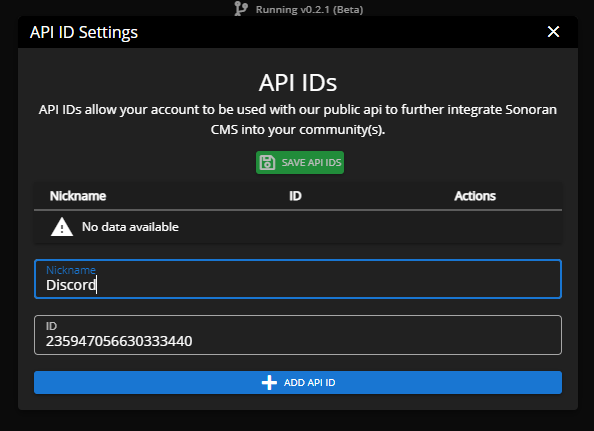
![Sonoran CMS - API ID Settings](https://3006847189-files.gitbook.io/~/files/v0/b/gitbook-x-prod.appspot.com/o/spaces%2F-MdBOa9OFjtdqw9FdXli%2Fuploads%2Fgit-blob-43792b3116961acb3238102ad32679dc6ca823d3%2Fopera_MpJ5zHtR9i.png?alt=media)

### 4. Add API ID & Save

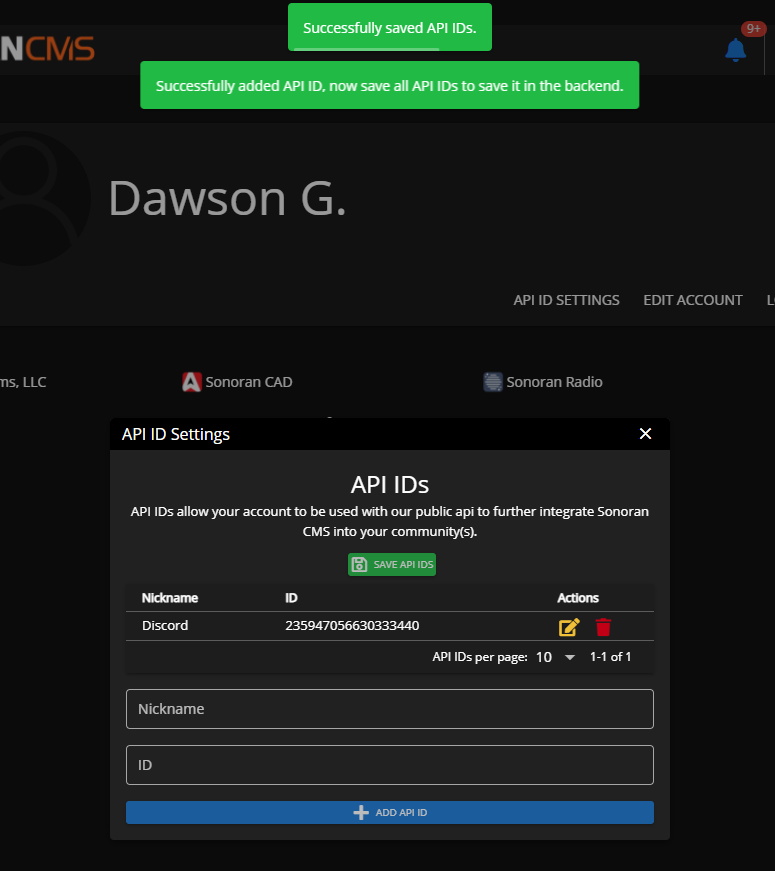
Click the blue "ADD API ID" button and click the green "SAVE API IDS" button at the top to save it in the backend.
![Sonoran CMS - Saving API ID Settings](https://3006847189-files.gitbook.io/~/files/v0/b/gitbook-x-prod.appspot.com/o/spaces%2F-MdBOa9OFjtdqw9FdXli%2Fuploads%2Fgit-blob-1275843819f34a36b51e85349c84490e2b8258a6%2Fopera_GlTSLKNlv5.png?alt=media)

## Changing Your Community Account's API ID Settings

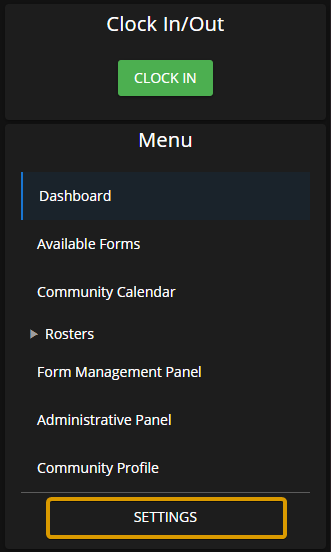
### 1. Open Settings

From the main Sonoran CMS community Dashboard view, select "Settings" at the bottom of the left menu

![Sonoran CMS - Main Community Dashboard Side Menu](https://3006847189-files.gitbook.io/~/files/v0/b/gitbook-x-prod.appspot.com/o/spaces%2F-MdBOa9OFjtdqw9FdXli%2Fuploads%2Fgit-blob-29e0bd35a8655515f245d2eaac8f61bb0ea9eb4a%2FApplicationFrameHost_5csYBqWQW8.png?alt=media)

### 2. Select your API ID Preferences

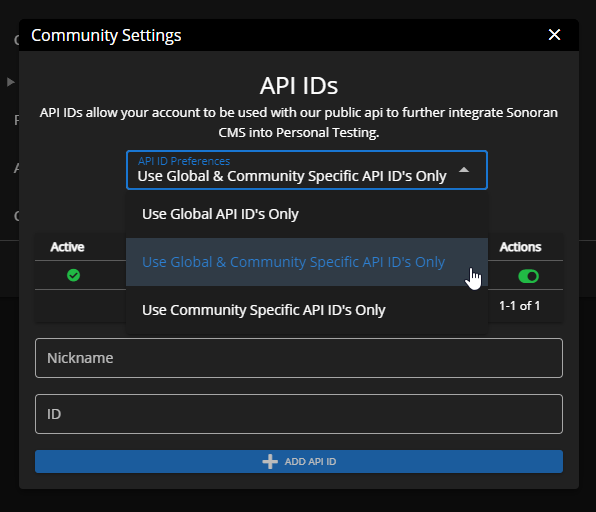
Select the drop-down for API ID preferences and select your preference
![Sonoran CMS - Community API ID Settings](https://3006847189-files.gitbook.io/~/files/v0/b/gitbook-x-prod.appspot.com/o/spaces%2F-MdBOa9OFjtdqw9FdXli%2Fuploads%2Fgit-blob-21262077b613fa411ae9bacb0369c94d597b7af9%2Fopera_cFXNEMY4YQ.png?alt=media)

### 3. Add API ID's

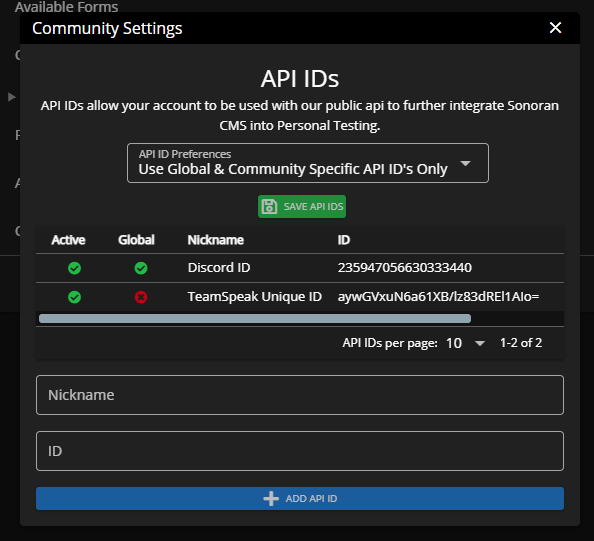
Depending on your preferences you can add more API IDs that are specifically only on your community account.
![Sonoran CMS - Community API ID Settings](https://3006847189-files.gitbook.io/~/files/v0/b/gitbook-x-prod.appspot.com/o/spaces%2F-MdBOa9OFjtdqw9FdXli%2Fuploads%2Fgit-blob-40779ff35c7055f1689a8ccae6b17df0bfcb9f95%2Fopera_CjgXdn0Im7.png?alt=media)