

# Configuring User Permissions

{% embed url="<https://app.guidde.com/share/playbooks/tZ6JoJVGXMWeJZejtoNmci?origin=G25dDmjNZ2b8ccFUz9X7G7W8T1k1>" %}

## Rank Permissions

When configuring a rank, each permission can be set to **Grant**, **Unset**, or **Deny**:

* **Grant** — Explicitly gives the permission to anyone with that rank.
* **Unset** — Neither grants nor denies the permission; it simply leaves it unchanged.
* **Deny** — Blocks the permission, even if another rank would otherwise grant it. A denied permission always overrides a grant.
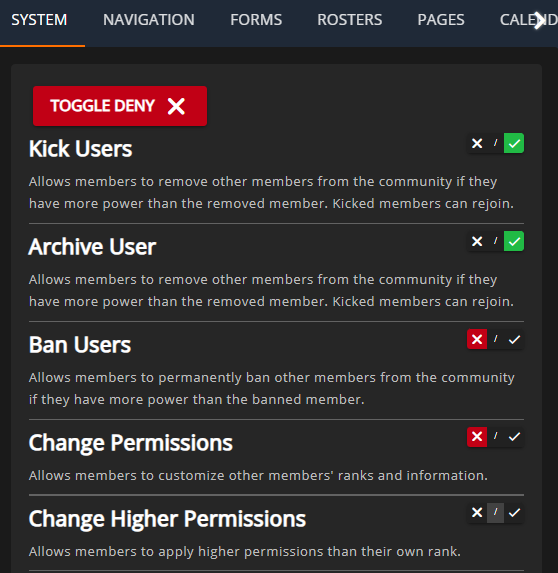
Use **Deny** sparingly. It’s best suited for special ranks that must override other granted permissions, such as a temporary ban rank. In most cases, leaving a permission **Unset** is sufficient, as it will not grant the permission on its own.

<figure><img src="https://3006847189-files.gitbook.io/~/files/v0/b/gitbook-x-prod.appspot.com/o/spaces%2F-MdBOa9OFjtdqw9FdXli%2Fuploads%2Fgit-blob-74288392dea32d6c121c280ee01c76875eeaef55%2Fimage.png?alt=media" alt="" width="419"><figcaption></figcaption></figure>

## Viewing User Permissions

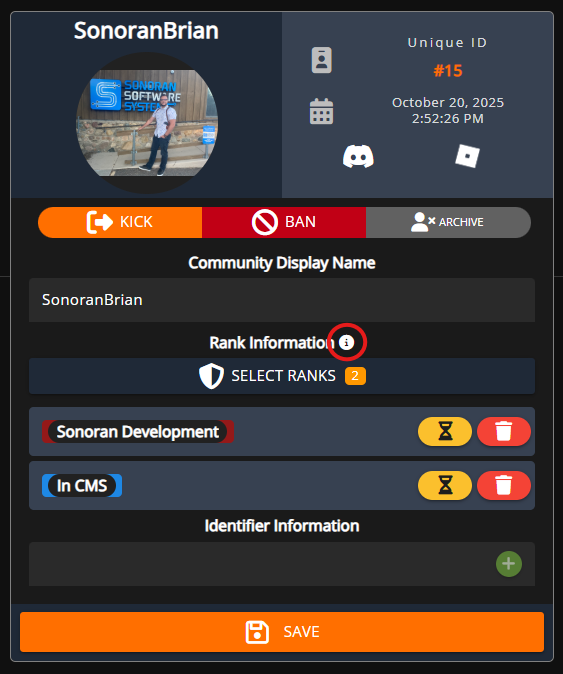
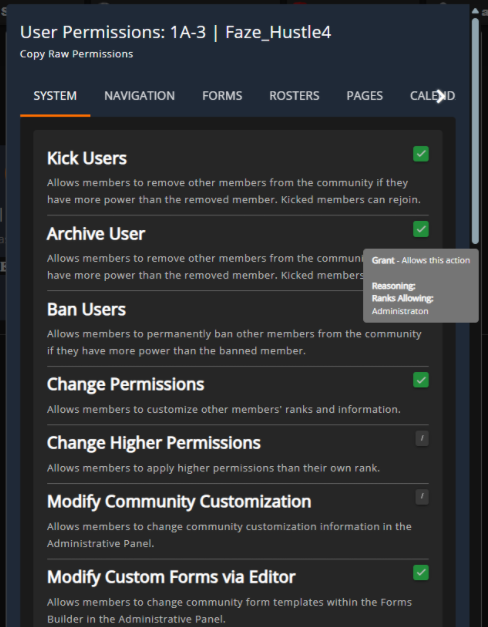
You can view a user’s computed permissions directly in the account portal. Click the **(i)** icon above their ranks to see every permission that’s granted, unset, or denied. Hover over any permission to see a tooltip listing the groups and ranks responsible for granting or denying it.
<div><figure><img src="https://3006847189-files.gitbook.io/~/files/v0/b/gitbook-x-prod.appspot.com/o/spaces%2F-MdBOa9OFjtdqw9FdXli%2Fuploads%2Fgit-blob-6da3479585ad8bffe4709ffe0285f582ac8accbc%2Fimage.png?alt=media" alt=""><figcaption></figcaption></figure> <figure><img src="https://3006847189-files.gitbook.io/~/files/v0/b/gitbook-x-prod.appspot.com/o/spaces%2F-MdBOa9OFjtdqw9FdXli%2Fuploads%2Fgit-blob-231ceb62fe9b31a3638830a381493e37312758cb%2Fimage.png?alt=media" alt=""><figcaption></figcaption></figure></div>
