> For the complete documentation index, see [llms.txt](https://docs.sonoransoftware.com/llms.txt). Markdown versions of documentation pages are available by appending `.md` to page URLs; this page is available as [Markdown](https://docs.sonoransoftware.com/store/dashcam/playback.md).
# Playback and Evidence
Search Dashcam evidence, replay incidents from six views, and manage notes, classifications, locks, archives, and retention.
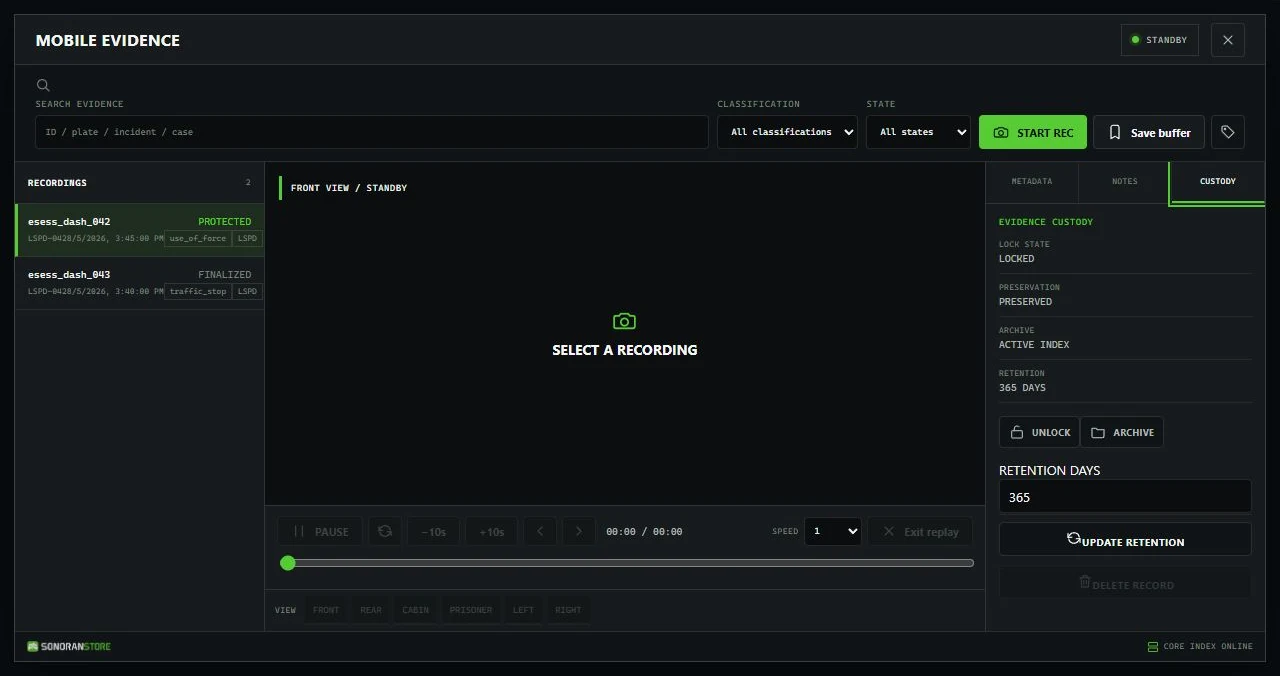
Finalized recordings appear in the Mobile Evidence terminal for authorized reviewers. Press F7 or run /dashcamreview, then search or filter the evidence list and select a record.
## Find a recording
The terminal can search the information attached to accessible evidence, including:
* Recording ID
* Vehicle or plate
* Department
* Incident or case number
* Citation number
* Arrest-report number
You can also filter by classification and finalized state. The result list is permission-filtered, so users only see their own, departmental, or all evidence according to their access.
## Six replay views
Every Dashcam recording includes these vehicle-mounted viewpoints:
| View | Shipped field of view |
| -------- | --------------------: |
| Front | 72 degrees |
| Rear | 70 degrees |
| Cabin | 85 degrees |
| Prisoner | 90 degrees |
| Left | 68 degrees |
| Right | 68 degrees |
The saved recording keeps its vehicle-camera definition, so a reviewer can return after the original vehicle or scene is gone.
## Playback controls
Open **Structured Replay** from the selected record. The terminal supports:
* Play and pause
* Restart
* Seek with the timeline
* Skip backward or forward 10 seconds
* Step backward or forward
* Playback speeds of 0.25x, 0.5x, 1x, 2x, and 4x
* Switching among all six views
* Exiting replay and returning to the evidence terminal
Dashcam recreates the incident inside FiveM from recorded gameplay state. A normal Dashcam replay is not an MP4 or continuous screen recording. Separate video generation or upload requires an optional compatible processing setup.
## Evidence details
Depending on permissions, reviewers can:
* Set the classification
* Add or update incident, case, citation, and arrest-report numbers
* Add operational notes
* Lock or unlock the record
* Archive or unarchive the record
* Change retention days
* Delete an unlocked, unpreserved record with a substantive reason
Locked records cannot be edited or deleted until an authorized reviewer unlocks them. Deletion is permanent and requires dashcam.delete.
## Shipped classifications and retention
| Classification | Retention |
| -------------- | ------------------: |
| routine | 7 days |
| traffic\_stop | 30 days |
| arrest | 90 days |
| use\_of\_force | 365 days |
| training | 30 days |
| indefinite | No automatic expiry |
Changing a record's classification applies that classification's configured retention policy. A retention value of 0 means the record has no automatic expiry. Review your local policy and available storage before extending retention.
Record metadata is stored under eventsCore/data/recordings by default. Back up evidence securely before updates or storage changes.
Authorized evidence custodians can protect, archive, retain, or delete records from the same review terminal.
---
# Agent Instructions
This documentation is published with GitBook. GitBook is the documentation platform designed so that both humans and AI agents can read, navigate, and reason over technical content effectively. Learn more at gitbook.com.
## Querying This Documentation
If you need additional information that is not directly available in this page, you can query the documentation dynamically by asking a question.
Perform an HTTP GET request on the current page URL with the `ask` query parameter, and the optional `goal` query parameter:
```
GET https://docs.sonoransoftware.com/store/dashcam/playback.md?ask=&goal=
```
`ask` is the immediate question: it should be specific, self-contained, and written in natural language.
`goal` is optional and describes the broader end goal you are ultimately trying to accomplish on behalf of the user. GitBook uses it to tailor the answer towards what is most useful for that goal.
The response will contain a direct answer to the question and relevant excerpts and sources from the documentation.
Use this mechanism when the answer is not explicitly present in the current page, you need clarification or additional context, or you want to retrieve related documentation sections.