# Submodule Configuration

## Install the Resource

If you have not already, [install the base FiveM resource](/cad/integration-plugins/in-game-integration/fivem-installation.md).

## Activating a Submodule

The [FiveM resource](/cad/integration-plugins/in-game-integration/fivem-installation.md) contains multiple "submodules" for each integration. These can be individually enabled/disabled and configured.

{% content-ref url="/pages/sgIyAQyYroJy46k7JfvC" %}
[FiveM Submodules](/cad/integration-plugins/in-game-integration/available-plugins.md)
{% endcontent-ref %}

This example uses the `postals` submodule.

### 1. Configure and Enable the Submodule

* Navigate to the `\sonorancad\configuration` folder and locate the configuration file for your desired submodule.
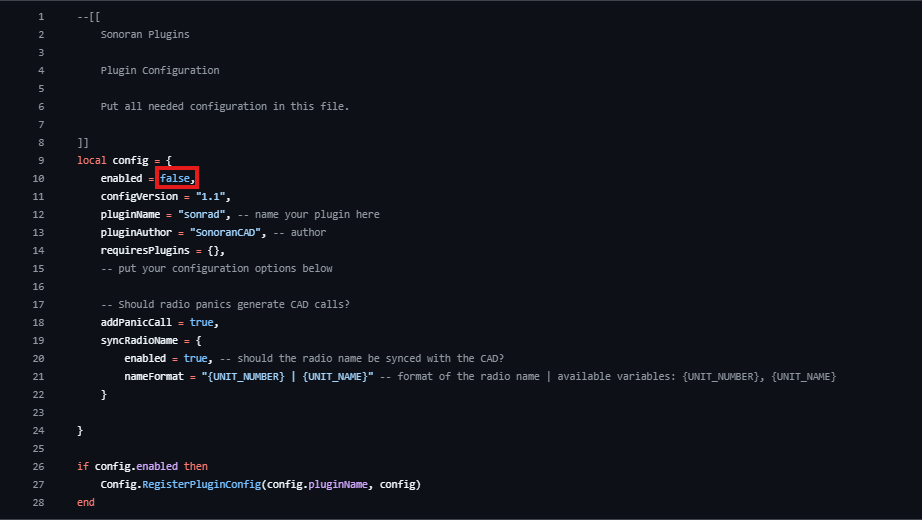
  * For this example we will be using the `sonrad_config.lua` file (name depends on the submodule).
* **Enable** the submodule by changing the `enabled` variable from `false` to `true` in the submodule config.

<figure><img src="/files/3TjLsH2Lshfunw4UZUSQ" alt=""><figcaption></figcaption></figure>

### 2. Rename and Save

#### Rename

While the pre-configured resource should already have the file renamed, you may need to remove `.dist` from the configuration file name.

Ex: `sonrad_config.dist.lua` > `sonrad_config.lua`

#### Save

Save the lua file's changes.

### 3. Restart Sonoran CAD

Restart the `sonorancad` resource by entering `ensure sonorancad` in the server console and enjoy your submodule!


---

# Agent Instructions: Querying This Documentation

If you need additional information that is not directly available in this page, you can query the documentation dynamically by asking a question.

Perform an HTTP GET request on the current page URL with the `ask` query parameter:

```
GET https://docs.sonoransoftware.com/cad/integration-plugins/in-game-integration/submodule-configuration.md?ask=<question>
```

The question should be specific, self-contained, and written in natural language.
The response will contain a direct answer to the question and relevant excerpts and sources from the documentation.

Use this mechanism when the answer is not explicitly present in the current page, you need clarification or additional context, or you want to retrieve related documentation sections.