

Slow lookups
Sometimes with certain server hosts, their networks tend to respond slower for a variety of reasons. In MySQL there is a process as part of each login in which a DNS lookup is run before the CAD or other database users can be allowed in. With slow DNS server settings, this can sometimes cause lookups to take 5-20 seconds in the CAD. We are going to show you one way to resolve this in MySQL Server/MariaDB Server. 1. Open your my.ini configuration file for your MySQL server. If you are using XAMPP simply open the XAMPP Control Panel and clickConfig then my.ini from the line for your MySQL Module.
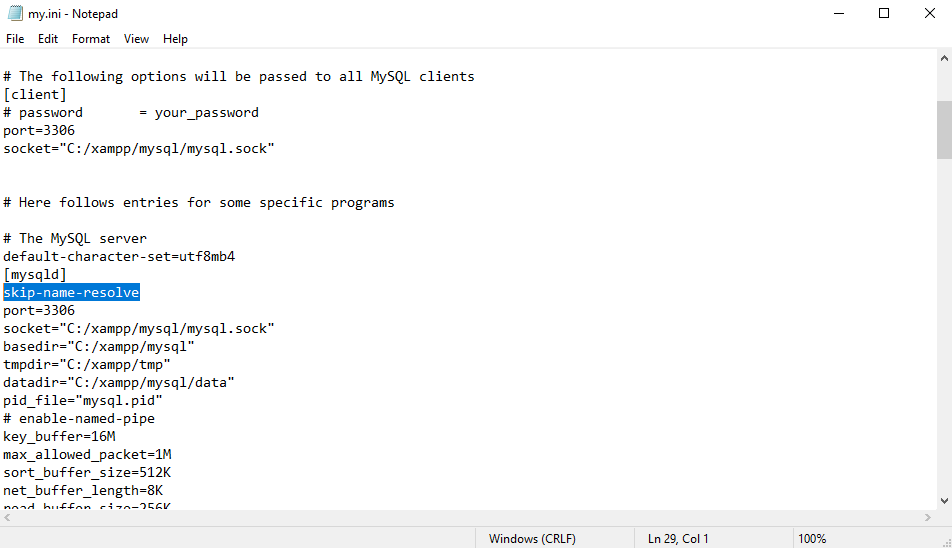
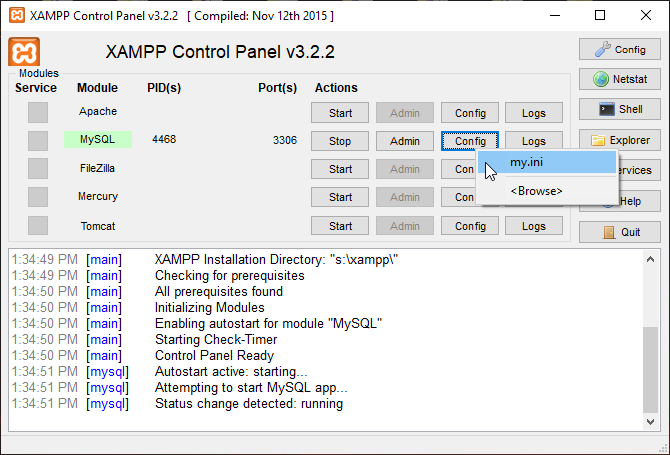 2. With the my.ini configuration file open, scroll down till you find the “[mysqld]” section and add the following line right under
 [mysqld]
skip-name-resolve
 3. Save the my.ini file and then restart your MySQL server. For XAMPP simply click Stop in the XAMPP Control Panel then click Start.
Your lookups in Sonoran CAD with DBSync enabled should now be faster. If your lookup speed is still slow (ie. takes over 5 seconds) this is usually due to much greater issues either with the performance of your server or network.
3. Save the my.ini file and then restart your MySQL server. For XAMPP simply click Stop in the XAMPP Control Panel then click Start.
Your lookups in Sonoran CAD with DBSync enabled should now be faster. If your lookup speed is still slow (ie. takes over 5 seconds) this is usually due to much greater issues either with the performance of your server or network.