# Expert Installation

<figure><img src="https://1965378849-files.gitbook.io/~/files/v0/b/gitbook-x-prod.appspot.com/o/spaces%2FYoRQIjwkmv5RMxz7UhfR%2Fuploads%2FS9cEWibO20BsJKAxKAmC%2Finstall2.png?alt=media&#x26;token=6a7b7c88-61e3-4670-b653-873f8dfde7eb" alt=""><figcaption></figcaption></figure>

## What is expert installation?

Our support agents are available 7 days/week to help install and configure all of your Sonoran CAD, CMS, and Radio plugins on your Windows VPS or dedicated server!

Expert installation is a one-time payment of $34.99 and covers THREE (3) non-transferable installation credits.\
These credits can be used for:

* Sonoran CAD - Framework and Plugin Installation
* Sonoran CMS - Addon Installation
* Sonoran Radio - In-Game Radio and Addon Installation

## How do I purchase expert installation?

### At checkout:

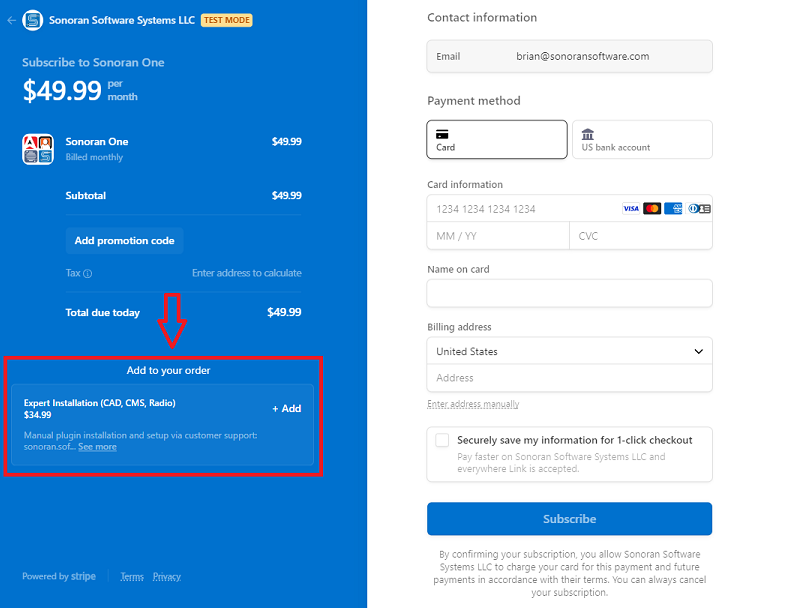
When purchasing a new subscription for Sonoran CAD, CMS, or Radio; click `Add` on the `Expert Installation` option under `Add to your order` on the checkout page.

<figure><img src="https://1965378849-files.gitbook.io/~/files/v0/b/gitbook-x-prod.appspot.com/o/spaces%2FYoRQIjwkmv5RMxz7UhfR%2Fuploads%2F9Y9Ws2rFTBSyCFEmOip6%2Fimage.png?alt=media&#x26;token=6dad39b0-b980-4c38-895a-436796120233" alt="" width="375"><figcaption><p>Expert Installation - Add to Order</p></figcaption></figure>

### In the billing portal:

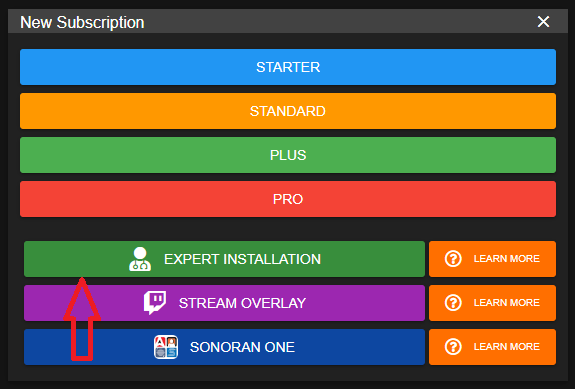
In the CAD, CMS, or Radio billing portal, select `New Subscription` > `Expert Installation`

<figure><img src="https://1965378849-files.gitbook.io/~/files/v0/b/gitbook-x-prod.appspot.com/o/spaces%2FYoRQIjwkmv5RMxz7UhfR%2Fuploads%2F1F7Up2tTchDm1fgSicyr%2Fimage.png?alt=media&#x26;token=4927c8e3-4d29-4a70-919f-ff5b4c7e7f3a" alt="" width="288"><figcaption><p>Expert Installation - New Purchase</p></figcaption></figure>

## Requirements for Installation

1. Windows VPS or Dedicated Server
2. Windows RDP Access (shared with support agent)
3. Sonoran CAD, CMS, or Radio subscription

## FAQ

### Can I redeem another product installation at a later date?

Yes! Your purchase is valid for three installation credits. You could have the agent install and configure CAD plugins and install CMS plugins at a later date.

### Is this purchase eligible for a refund?

All of our products are covered in our [48-hour moneyback guarantee](https://sonoransoftware.com/assets/files/internal/purchase_policy.pdf). However, this service is not non-refundable after the labor has been performed, regardless if one or all credits have been used.

### The support agent has installed my plugins, what's next?

{% tabs %}
{% tab title="CAD" %}
Configure your submodules and start using Sonoran CAD!

{% content-ref url="<https://app.gitbook.com/s/-M4pGN81fb4R6zFhodcu/integration-plugins/in-game-integration/fivem-installation/submodule-configuration>" %}
[Submodule Configuration](https://app.gitbook.com/s/-M4pGN81fb4R6zFhodcu/integration-plugins/in-game-integration/fivem-installation/submodule-configuration)
{% endcontent-ref %}
{% endtab %}

{% tab title="CMS" %}
Configure your submodules and start using Sonoran CMS!

{% content-ref url="<https://app.gitbook.com/s/-MdBOa9OFjtdqw9FdXli/integration-capabilities/in-game-integration-resources/core/free-plugin-installation-next-steps>" %}
[FiveM Installation - Next Steps](https://app.gitbook.com/s/-MdBOa9OFjtdqw9FdXli/integration-capabilities/in-game-integration-resources/core/free-plugin-installation-next-steps)
{% endcontent-ref %}
{% endtab %}

{% tab title="Radio" %}
Once installed, learn how to use Sonoran Radio!

{% content-ref url="<https://app.gitbook.com/s/fCk5zoeun5gx3ujYW6eg/tutorials/usage>" %}
[Usage](https://app.gitbook.com/s/fCk5zoeun5gx3ujYW6eg/tutorials/usage)
{% endcontent-ref %}
{% endtab %}
{% endtabs %}