

> For the complete documentation index, see [llms.txt](https://docs.sonoransoftware.com/llms.txt). Markdown versions of documentation pages are available by appending `.md` to page URLs; this page is available as [Markdown](https://docs.sonoransoftware.com/store/bodycam.md).

# Bodycam

Bodycam gives public-safety personnel a body-worn evidence workflow inside FiveM. It preserves activity before and after an incident, supports manual and automatic recording triggers, and lets authorized staff review the event later from the recorded wearer's perspective.

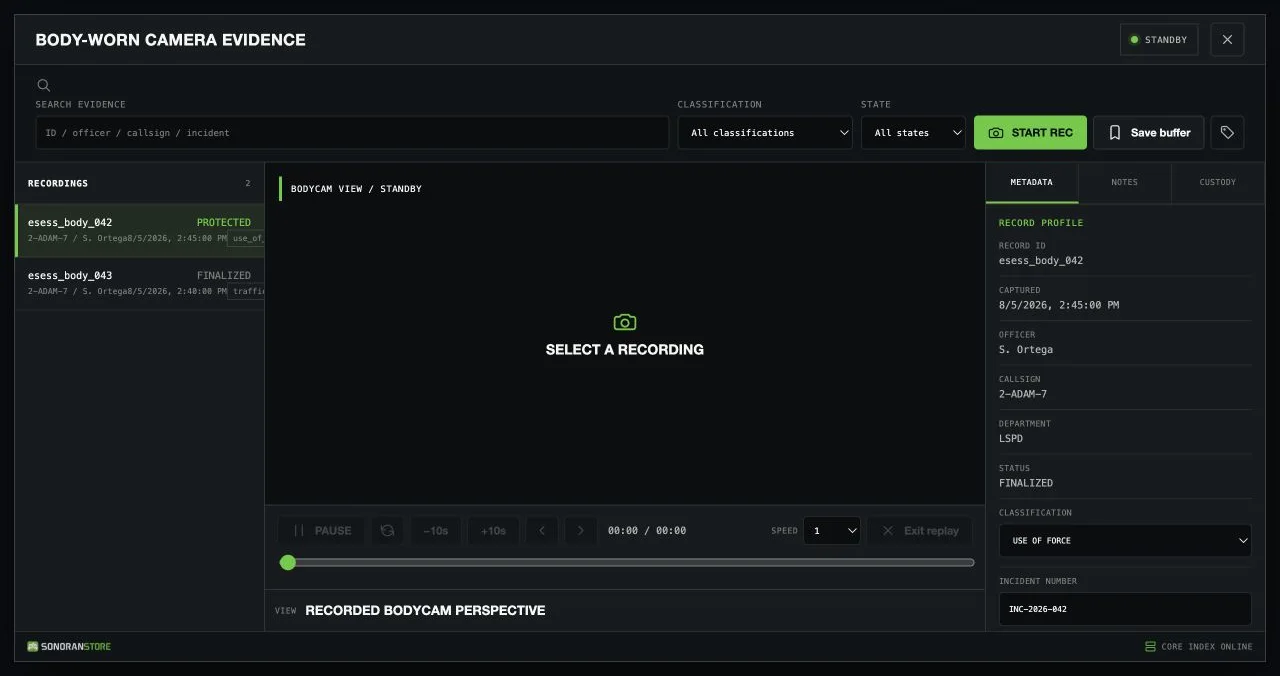
<figure><img src="/files/wgdLFzp7y4OPvWhsZq9l" alt="Bodycam evidence terminal with a selected use-of-force recording"><figcaption><p>Record, search, review, and manage body-worn evidence from one in-game terminal.</p></figcaption></figure>

{% hint style="info" %}
**Bodycam is a paid DLC for the free Events Core package.** Install Events Core once to provide the shared recording, replay, storage, and event logic required by Bodycam and other Events products. Events Core does not add a separate gameplay interface by itself.
{% endhint %}

## Preserve the wearer's perspective

Each eligible wearer receives one server-authorized camera attached to the configured ped bone. The rolling pre-event buffer helps preserve what led up to an incident instead of starting only after the record button was pressed.

A recording can begin from:

* A manual recording or saved buffer
* The wearer's weapon discharge
* Configured wearer damage or officer-down thresholds
* A panic activation
* A configured dispatch or integration trigger

If another trigger occurs during an active recording, Bodycam adds an evidence marker to the same timeline instead of creating a duplicate recording.

## Review historic evidence

Bodycam reconstructs the recorded incident inside FiveM from the saved gameplay state. Reviewers can play, pause, seek, skip, step through the timeline, change replay speed, and return to the single recorded bodycam perspective after the original wearer and scene are gone.

The standard replay is not a conventional video file. Optional video generation, external storage, CAD, or Discord workflows require a separately configured Events Core integration.

## Control access and custody

ACE permissions and optional framework job grades control who can wear and record with a bodycam, review their own or departmental evidence, add notes, classify records, lock or archive evidence, change retention, and delete unprotected records.

Wearer eligibility can use permission/job access by itself, accept any enabled permission, inventory, or EUP check, or require every enabled check. EUP and inventory eligibility are evaluated on the server through editable integration adapters.

## How it works

1. An eligible, authorized player joins or changes into an approved duty state.
2. Bodycam binds one camera to the server-observed player ped.
3. A manual or automatic trigger starts a recording with pre-event context.
4. The finalized record appears in the Body-Worn Camera Evidence terminal.
5. An authorized reviewer searches for the record and reconstructs the incident from the recorded perspective.

## Requirements

| Requirement    | Details                                                                                           |
| -------------- | ------------------------------------------------------------------------------------------------- |
| Events Core    | Free required package: [download Events Core](https://sonoran.store/packages/7606652-events-core) |
| Events Bodycam | Paid Bodycam DLC from the [Sonoran Store](https://sonoran.store/)                                 |
| FXServer       | A current FiveM server with OneSync enabled                                                       |
| Permissions    | ACE permissions or a supported framework job setup                                                |
| Framework      | Standalone by default; ESX, QBCore, and Qbox context can be configured                            |
| Database       | No SQL database is required by the default configuration                                          |

## Start here

1. Follow [Installation](/store/bodycam/installation.md) to install Events Core and Bodycam in the correct order.
2. Review [Configuration](/store/bodycam/configuration.md), [Wearer Setup](/store/bodycam/wearer-setup.md), and [Permissions](/store/bodycam/permissions.md).
3. Test manual and automatic [Recording](/store/bodycam/recording.md) with an eligible wearer.
4. Open the finalized record and test [Playback and Evidence](/store/bodycam/playback.md).

Building an integration? See the [Developer API](/store/bodycam/developer-api.md) for supported exports and lifecycle events.

For help, see [Troubleshooting](/store/bodycam/troubleshooting.md) or contact [Sonoran Software support](https://support.sonoransoftware.com/).


---

# Agent Instructions
This documentation is published with GitBook. GitBook is the documentation platform designed so that both humans and AI agents can read, navigate, and reason over technical content effectively. Learn more at gitbook.com.

## Querying This Documentation
If you need additional information that is not directly available in this page, you can query the documentation dynamically by asking a question.

Perform an HTTP GET request on the current page URL with the `ask` query parameter, and the optional `goal` query parameter:

```
GET https://docs.sonoransoftware.com/store/bodycam.md?ask=<question>&goal=<endgoal>
```

`ask` is the immediate question: it should be specific, self-contained, and written in natural language.
`goal` is optional and describes the broader end goal you are ultimately trying to accomplish on behalf of the user. GitBook uses it to tailor the answer towards what is most useful for that goal.

The response will contain a direct answer to the question and relevant excerpts and sources from the documentation.

Use this mechanism when the answer is not explicitly present in the current page, you need clarification or additional context, or you want to retrieve related documentation sections.
