# API Options for Adding and Modifying Records

## Available Endpoints

All endpoints for new and existing records and characters utilize these two common methods.

{% content-ref url="new-record" %}
[new-record](https://docs.sonoransoftware.com/cad/api-integration/api-endpoints/general/custom-records/new-record)
{% endcontent-ref %}

{% content-ref url="edit-record" %}
[edit-record](https://docs.sonoransoftware.com/cad/api-integration/api-endpoints/general/custom-records/edit-record)
{% endcontent-ref %}

{% content-ref url="../../civilian/new-character" %}
[new-character](https://docs.sonoransoftware.com/cad/api-integration/api-endpoints/civilian/new-character)
{% endcontent-ref %}

{% content-ref url="../../civilian/edit-character" %}
[edit-character](https://docs.sonoransoftware.com/cad/api-integration/api-endpoints/civilian/edit-character)
{% endcontent-ref %}

## Option 1 - Dictionary Values

The easiest way to create or modify a custom record via API is to supply a "dictionary" of key/value field pairs.

### 1. Getting the \`recordTypeId\`

For **adding a new record or character**, you will need to specify the `recordTypeId.`

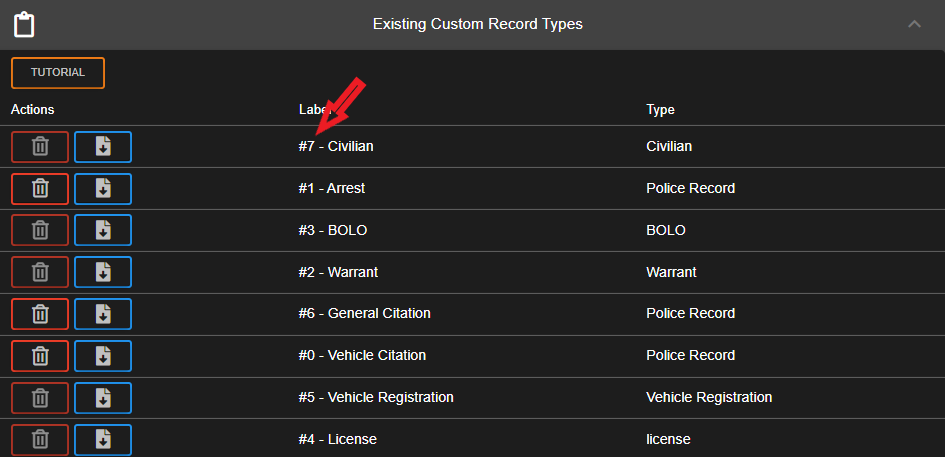
The `recordTypeId` is a unique number for your custom record template. This is visible in the custom record JSON's `recordTypeId` field, or next to the template name in the admin menu.
![Custom Records - Record Type ID](https://232668649-files.gitbook.io/~/files/v0/b/gitbook-x-prod.appspot.com/o/spaces%2F-M4pGN81fb4R6zFhodcu%2Fuploads%2F4A6IAETZ00DFLDDJAZvl%2Fimage.png?alt=media\&token=f4ed699c-0454-455f-93fd-526909a298ba)

### 2. Getting the \`recordId\`

For **modifying an existing record or character**, you will need to specify the `recordId`.

When viewing a record's JSON from a lookup endpoint, the record's `id` field is the unique ID for that filed record.

You can also view a record's ID in the UI with an `id` type custom field.

![Custom Records - Record ID](https://232668649-files.gitbook.io/~/files/v0/b/gitbook-x-prod.appspot.com/o/spaces%2F-M4pGN81fb4R6zFhodcu%2Fuploads%2FjSe209eqJchxhQLeSv18%2Fimage.png?alt=media\&token=3a40f947-fe8a-4752-b834-ccc1fae49818)

### 3. Creating the \`replaceValues\` Dictionary

The `replaceValues` dictionary specifies the field UID (unique ID) and the desired text value to input.

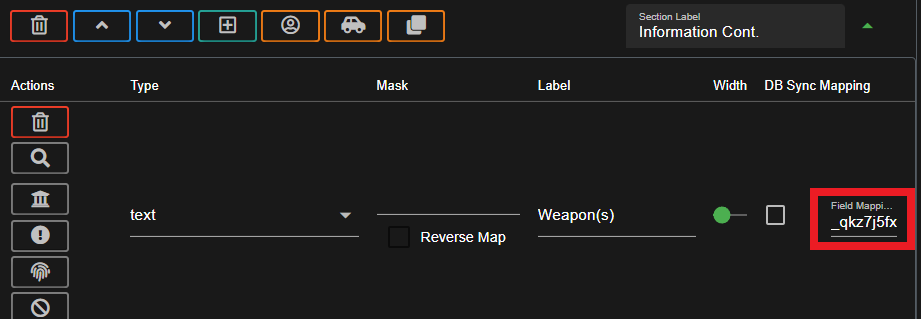
You can easily copy a template field's UID in the admin menu by expanding the section and copying the very last column in the editor. This is shown as the `Field Mapping ID` or `Field UID`.

![Custom Records - Field UID](https://232668649-files.gitbook.io/~/files/v0/b/gitbook-x-prod.appspot.com/o/spaces%2F-M4pGN81fb4R6zFhodcu%2Fuploads%2FEsCdp28vgwxyUuCiUcCq%2Fimage.png?alt=media\&token=76a8b7a7-9e7e-4ed9-b710-aca7d4276024)

#### **Example Dictionary**

```json
"replaceValues": {
    "first": "Brian", // Set field with UID of 'first' to 'Brian'
    "_qkz7j5fxy": "Some Value" // Set field with UID of '_qkz7j5fxy' to 'Some Value'
}
```

### Dictionary for Checkboxes Fields

For the custom `checkboxes` field, the available box options are stored in the `field.options` array and the selected values are stored in the `field.data.flags` array.

<details>

<summary>JSON String - Checkboxes Data</summary>

```json
// Checkboxes options are set in the field.options array
// Checkboxes selections are set in the field.data.flags array
// Ex: options: ["CHECKBOX 1", "CHECKBOX 2", "CHECKBOX 3"]
// Ex: Select #1 & #3 data: { flags: ["CHECKBOX 1", "CHECKBOX 3"] }
// Stringified JSON:
"replaceValues": {
    "someUidCheckboxesField": "{\"flags\":[\"CHECKBOX 1\",\"CHECKBOX 3\"]}"
}
```

</details>

### Dictionary For Non-Custom Sections

For section types like `flags`, `charges`, `speed`, or `link` these objects are stored in a `data` object on the first `field` in the section. These `section` type enums can be found under the [custom record formatting](https://docs.sonoransoftware.com/cad/api-integration/api-endpoints/general/custom-records/..#section).

For these, the dictionary value should be a JSON string of the object that the `data` property will be set to.

<details>

<summary>JSON String - Flags Data</summary>

<pre class="language-json"><code class="lang-json"><strong>// Stringified JSON for the FLAGS object
</strong><strong>// Value will be stored in the section[index].fields[0].data
</strong><strong>// NOTE: `flags` property is an ARRAY of flag strings
</strong><strong>"replaceValues": {
</strong>    "someUidFlagsField": "{\"flags\":[\"FLAG 1\",\"FLAG 2\"]}"
}
</code></pre>

</details>

<details>

<summary>JSON String - Charges Data</summary>

<pre class="language-json"><code class="lang-json"><strong>// Stringified JSON for the CHARGES object
</strong><strong>// Value will be stored in the section[index].fields[0].data
</strong><strong>// NOTE: `charges` property is an ARRAY of charge objects
</strong><strong>"replaceValues": {
</strong>    "someUidChargesField": "{\"charges\":[{\"jailTime\":\"1 Year\",\"arrestCharge\":\"Some Crime\",\"arrestBondType\":\"Federal Bail Bond\",\"arrestBondAmount\":123,\"arrestChargeCode\":\"(1)23\",\"arrestChargeType\":\"Felony\",\"arrestChargeCounts\":1}]}"
}
</code></pre>

</details>

<details>

<summary>JSON String - Speed Data</summary>

<pre class="language-json"><code class="lang-json"><strong>// Stringfied JSON for the SPEED object
</strong><strong>// Value will be stored in the section[index].fields[0].data
</strong><strong>"replaceValues": {
</strong>    "someUidSpeedField": "{\"date\":\"2024/09/01\",\"fine\":\"123\",\"time\":\"03:30\",\"paceType\":\"Radar\",\"speedLimit\":\"50\",\"vehicleSpeed\":\"100\"}"
}
</code></pre>

</details>

<details>

<summary>JSON String - Link Data</summary>

<pre class="language-json"><code class="lang-json"><strong>// Stringified JSON for the Link object
</strong><strong>// Value will be stored in the section[index].fields[0].data
</strong><strong>// NOTE: `records` property is an ARRAY of record link objects
</strong><strong>"replaceValues": {
</strong>    "someUidLinkField": "{\"records\":[{\"link\":3,\"type\":8,\"label\":\"Arrest #3\"}]}"
}
</code></pre>

</details>

## Option 2 - Raw JSON

The more complicated but complete way to add or modify custom records via API is supplying the full, raw JSON structure of the record.

Custom records require a strict format with several dozen different data fields. Due to the complexity, it is highly recommended to create a new custom record template in the CAD UI, and then [retrieve the record template](https://docs.sonoransoftware.com/cad/api-integration/api-endpoints/general/custom-records/get-record-template) for adding new records.

Or, view a detailed explanation of [custom record formatting](https://docs.sonoransoftware.com/cad/api-integration/api-endpoints/general/custom-records/..#record-formatting).&#x20;