

Looking to compare plans?
View our pricing page!Looking to purchase a plan?
Create and Manage a Subscription
How do I change what community my subscription is applied to?
At any time with an active subscription (including canceled subscriptions that are still active) you may change what community is benefiting from the subscription. Simply change the community ID on the active subscription to a new one.Create and Manage a Subscription
How do I cancel, upgrade, or downgrade my subscription?
You can cancel, upgrade, or downgrade your subscription at any time using the payment center.Create and Manage a Subscription
Are subscriptions a one-time payment, or monthly?
With Sonoran CAD, you have the option to choose either a monthly or quarterly subscription. We offer multiple different subscription levels at different price ranges. You can compare our plans to see what works best for your community. By choosing a quarterly subscription, you are given a 25% discount. Simply select the 3-month billing option at checkout and the discount will automatically be applied!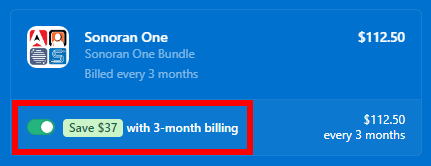 Sonoran Software - Quarterly Plan
Monthly subscriptions are renewed one month after the start date, and quarterly subscriptions are renewed three months after the start date. You will receive an email from Stripe a few days before you are charged again. This way, you aren’t charged again without prior notice.
Sonoran Software - Quarterly Plan
Monthly subscriptions are renewed one month after the start date, and quarterly subscriptions are renewed three months after the start date. You will receive an email from Stripe a few days before you are charged again. This way, you aren’t charged again without prior notice.