# Accessing the Payment Center

{% hint style="warning" %}
The payment center is only accessible from the **web or desktop version of Sonoran CAD**. The payment center **will not be visible using our iOS or Android** application.
{% endhint %}

### Access the Payment Center

1. Sign into [sonorancad.com](https://app.sonorancad.com)
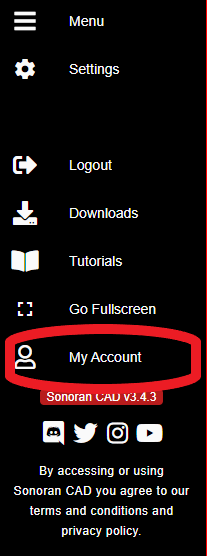
2. In the side navigation menu, select "My Account"

![Sonoran CAD - Access Account Menu](https://232668649-files.gitbook.io/~/files/v0/b/gitbook-legacy-files/o/assets%2F-M4pGN81fb4R6zFhodcu%2F-MN_kS54RQK9tE0Php8M%2F-MN_lpvSFK3N7CVMKcWZ%2Fimage.png?alt=media\&token=d3aec473-a867-49fb-a549-bcb0205041e3)

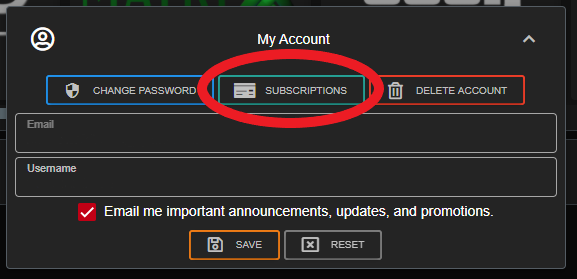
3\. Select "Subscriptions"\
\- This will open [sonorancad.com/billing](https://sonorancad.com/billing)<br>

![](https://232668649-files.gitbook.io/~/files/v0/b/gitbook-legacy-files/o/assets%2F-M4pGN81fb4R6zFhodcu%2F-MN_kS54RQK9tE0Php8M%2F-MN_nOIUKrnAOGu8bm-e%2Fimage.png?alt=media\&token=e2af51fe-aa4d-4ed0-b9a3-5c7dc20ea16e)