# Deleting or Transferring your CAD

{% hint style="warning" %}
Only the community owner can delete or transfer the community.
{% endhint %}

## 1. Access the Menu

Navigate to  Admin > Advanced > Transfer or Delete CAD
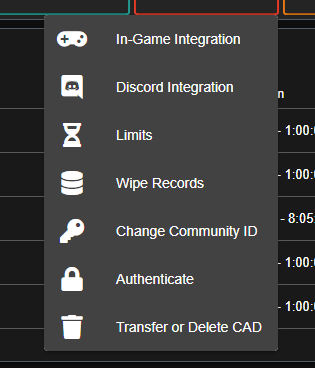
![Advanced Dropdown Menu](https://232668649-files.gitbook.io/~/files/v0/b/gitbook-legacy-files/o/assets%2Fsonoran-software%2F-MLkSgHDXEmelSirmuqo%2F-MLkTcdcY-kQxCsQp0OF%2F3.png?generation=1604983622732440\&alt=media)

## &#x20; 2. Transfer or Delete the CAD                  &#x20;

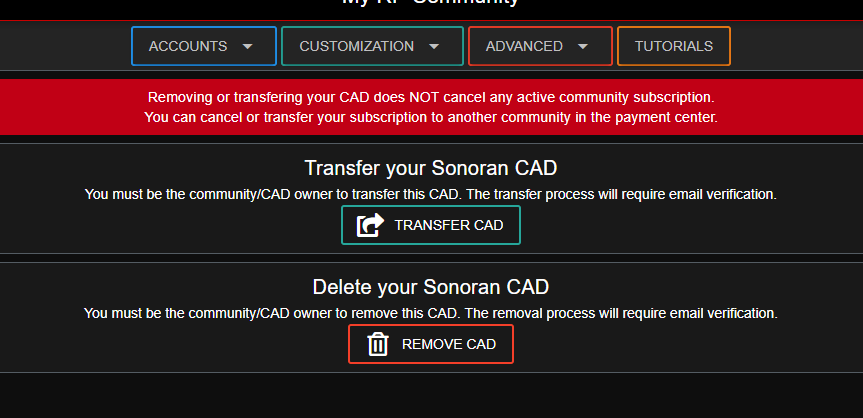
Select **TRANSFER CAD** or **REMOVE CAD**:

![Transfer or Remove CAD options](https://232668649-files.gitbook.io/~/files/v0/b/gitbook-legacy-files/o/assets%2Fsonoran-software%2F-MLkSgHDXEmelSirmuqo%2F-MLkTcddqqMX5D_eMVM3%2F4.png?generation=1604983622792035\&alt=media)

Once you have chosen an option, you will be **required** to verify your email. (This will be the email you originally signed up for the CAD with.) Upon clicking the verification link, the process will be completed.

{% hint style="danger" %}
Once a CAD is deleted, there is NO WAY for us to recover it. Please consider this before making your choice.
{% endhint %}