# Discord Rich Presence

{% hint style="danger" %}
**ATTENTION**: This feature is currently no longer within Sonoran CMS and will be reintroduced in a future update.
{% endhint %}

{% hint style="info" %}
Rich presence is included with all versions of Sonoran CMS, but customization requires the **Standard** plan or higher, and the **Pro** plan for complete customization with the icon.\
For more information, see our [pricing](https://docs.sonoransoftware.com/cms/pricing/pricing-faq) or view how to check your community [limits](https://docs.sonoransoftware.com/cms/tutorials/administrative/view-your-limits).
{% endhint %}

## What is Discord Rich Presence?

When running our [desktop application](https://docs.sonoransoftware.com/cms/download), Discord can automatically detect and display information about your community.
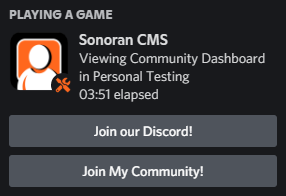
![Sonoran CMS - Discord Rich Presence](https://3006847189-files.gitbook.io/~/files/v0/b/gitbook-x-prod.appspot.com/o/spaces%2F-MdBOa9OFjtdqw9FdXli%2Fuploads%2Fgit-blob-0077d41600868b8c5088175efde820ab31a9ea83%2FDiscordPTB_Tzluj4WYgI.png?alt=media)

## Customizing your Rich Presence

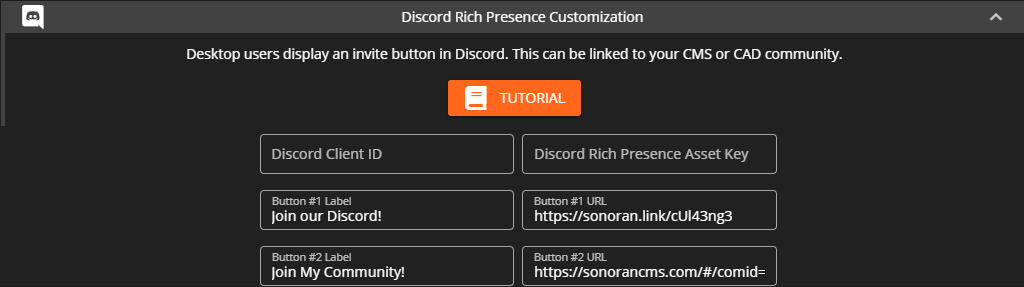
![Sonoran CMS - Discord Rich Presence Customization](https://3006847189-files.gitbook.io/~/files/v0/b/gitbook-x-prod.appspot.com/o/spaces%2F-MdBOa9OFjtdqw9FdXli%2Fuploads%2Fgit-blob-9b798b8629a4ffe5d3ec2d59e6f37f520cfc543b%2Felectron_U2tSqNbvS8.png?alt=media)

### Customizing Buttons

Discord presence currently allows for two customizable buttons.

Navigate to Administrator Panel > Customization > Community Customization > Discord Rich Presence Customization

#### For communities on the **Standard** plan or higher:

\- Button #2 may be customized to any [Sonoran CAD](https://github.com/Sonoran-Software/SonoranCMS-Documentation/blob/master/integration-capabilities/broken-reference/README.md) or [Sonoran CMS](https://info.sonorancms.com/why-choose-sonoran-cms/why-choose-sonoran-cms) invitation link.\
\- Ex: `https://sonorancad.com/#/?comid=mycommunityid` or `https://sonorancms.com/#/?comid=mycommunityid`

#### For communities on the Pro plan:

\- Both buttons may be customized to any URL desired.\
\- The Icon and title can also be customized with a Discord developer application.

### Customizing the Icon

Communities on the **Pro** version may customize the rich presence icon:

#### 1. Create a new Discord Application

On <https://discord.com/developers/applications> create a new application

![Discord Developer - New Application](https://3006847189-files.gitbook.io/~/files/v0/b/gitbook-x-prod.appspot.com/o/spaces%2F-MdBOa9OFjtdqw9FdXli%2Fuploads%2Fgit-blob-0bddefec49c5fb71eb0b0b2b6df432bdb31dff81%2Fimage.png?alt=media)

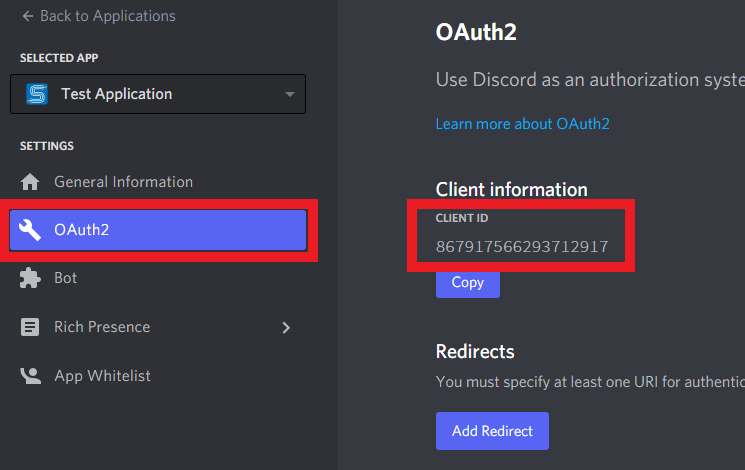
#### 2. Copy your Client ID

Under OAuth2, copy your `Client ID`

![Discord Developer - Application Client ID](https://3006847189-files.gitbook.io/~/files/v0/b/gitbook-x-prod.appspot.com/o/spaces%2F-MdBOa9OFjtdqw9FdXli%2Fuploads%2Fgit-blob-a4ed144c25ee62a5664107b0bf037cac46a69328%2Fimage%20\(1\).png?alt=media)

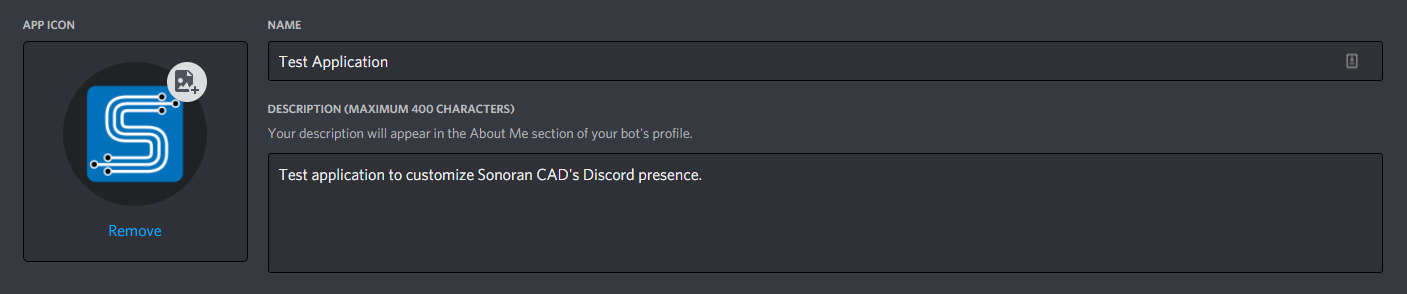
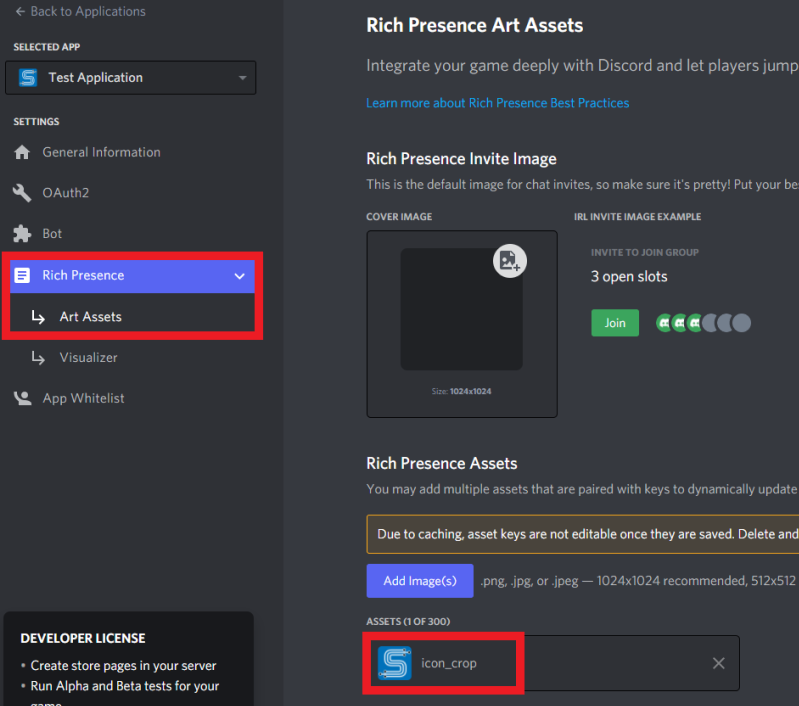
#### 3. Add an Icon

Next, upload an icon for your new application. Be sure to copy down the name of the icon for later.
![Discord Developer - Application Icon](https://3006847189-files.gitbook.io/~/files/v0/b/gitbook-x-prod.appspot.com/o/spaces%2F-MdBOa9OFjtdqw9FdXli%2Fuploads%2Fgit-blob-9a146d1b1ce0a4096f946577b8e70e7aa270eaef%2Fimage%20\(2\).png?alt=media)

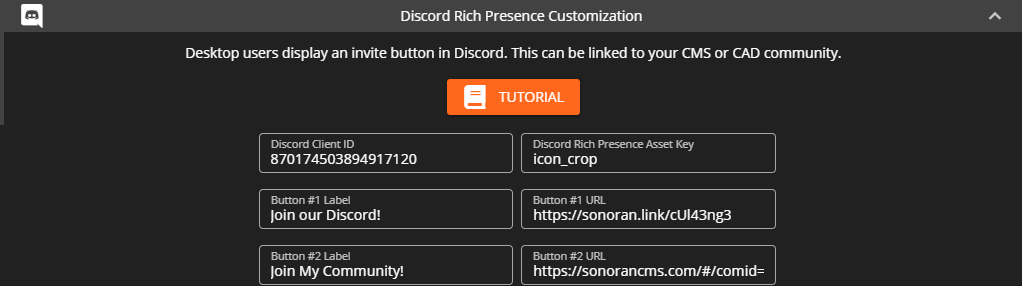
#### 4. Configure in Sonoran CMS

Back in the admin customization menu, we can paste the Discord application's Client ID and Icon name.

![Sonoran CMS - Custom Discord Presence Config](https://3006847189-files.gitbook.io/~/files/v0/b/gitbook-x-prod.appspot.com/o/spaces%2F-MdBOa9OFjtdqw9FdXli%2Fuploads%2Fgit-blob-bcdbdd38eb3271f3b908db90ed522437f7787153%2Felectron_usiYhP7qa1.png?alt=media)

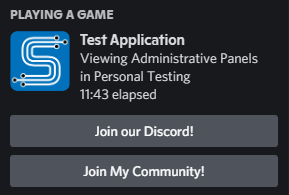
Once saved, your Discord presence for all community members will reflect your custom icon, title, and buttons.
![Sonoran CAD - Custom Discord Presence View](https://3006847189-files.gitbook.io/~/files/v0/b/gitbook-x-prod.appspot.com/o/spaces%2F-MdBOa9OFjtdqw9FdXli%2Fuploads%2Fgit-blob-5cae56d042ddc1e9a209fa1a7a15c87043ed0e1a%2FDiscordPTB_aQhYkv2DGy.png?alt=media)

## Toggle On/Off Rich Presence <a href="#toggle-on-off-rich-presence" id="toggle-on-off-rich-presence"></a>

### Community Toggle <a href="#community-toggle" id="community-toggle"></a>

To hide the invite button for your community's Discord Rich Presence, simply leave the button text and URL blank.

### User Toggle <a href="#user-toggle" id="user-toggle"></a>

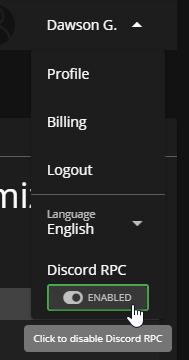
In the profile dropdown, users can toggle this display on or off for their individual desktop client.
![Sonoran CMS Profile Dropdown - Disable Discord's Rich Presence](https://3006847189-files.gitbook.io/~/files/v0/b/gitbook-x-prod.appspot.com/o/spaces%2F-MdBOa9OFjtdqw9FdXli%2Fuploads%2Fgit-blob-fa0f95e864d8bb3efa47fe4b5b7447dbb12f0992%2Felectron_KUr68rZjLj.png?alt=media)