

> For the complete documentation index, see [llms.txt](https://docs.sonoransoftware.com/llms.txt). Markdown versions of documentation pages are available by appending `.md` to page URLs; this page is available as [Markdown](https://docs.sonoransoftware.com/other/miscellaneous/delete-your-account.md).

# Delete Your Account

## How to Delete your Account

### 1. Login to the Account Portal

Log into your account at account.sonoransoftware.com.

### 2. Request Account Deletion

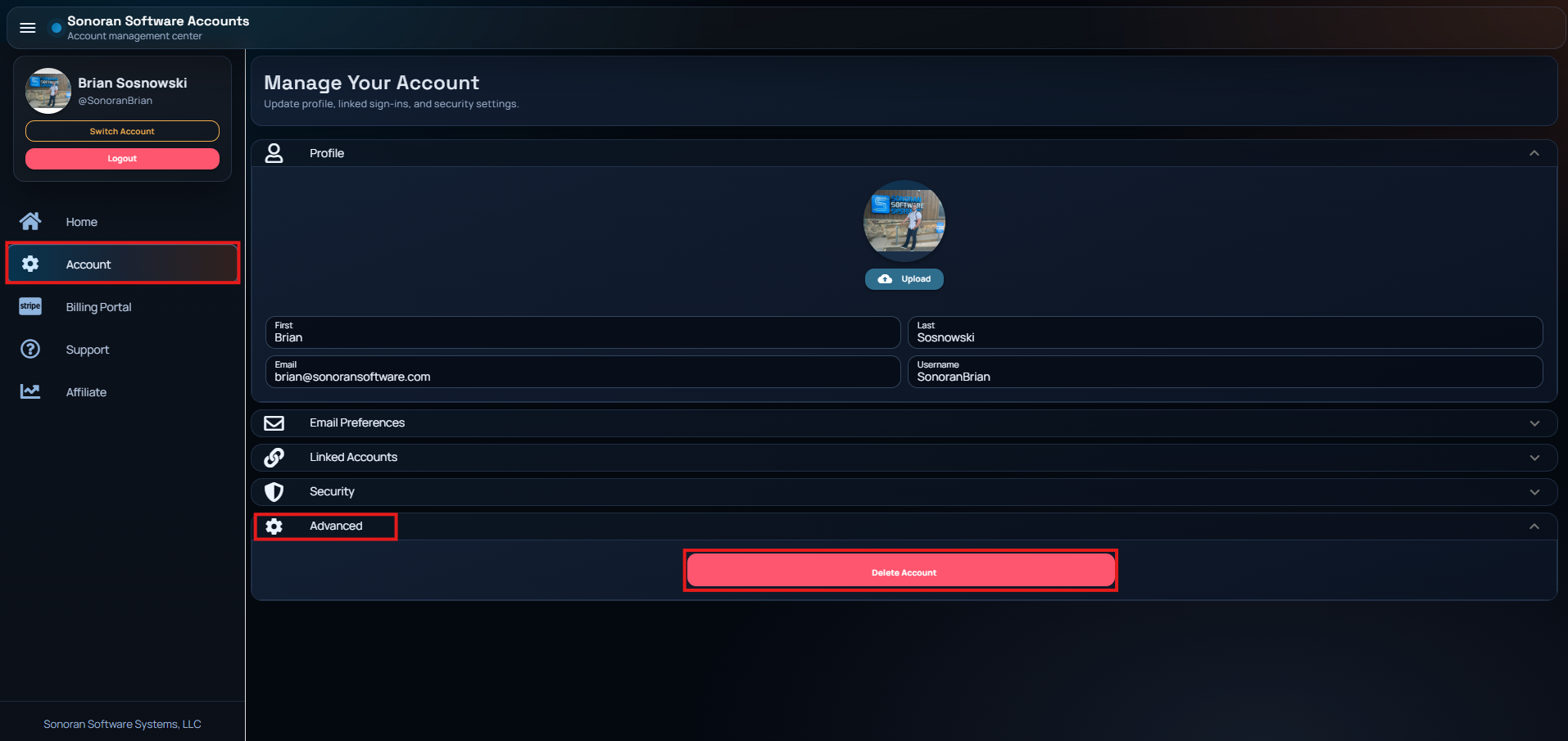
On the sidebar select **Account** > **Advanced** > **Delete Account**

* If your account has any active subscriptions, an error will inform you to cancel those first. These can be managed under **Billing** > Select the **Active** Subscription **> Manage**.
* You will be sent a confirmation email to delete your account.
<figure><img src="/files/HC617s0dXi7Np6SsHLwX" alt="" width="375"><figcaption></figcaption></figure>

### 3. Verify Deletion Email

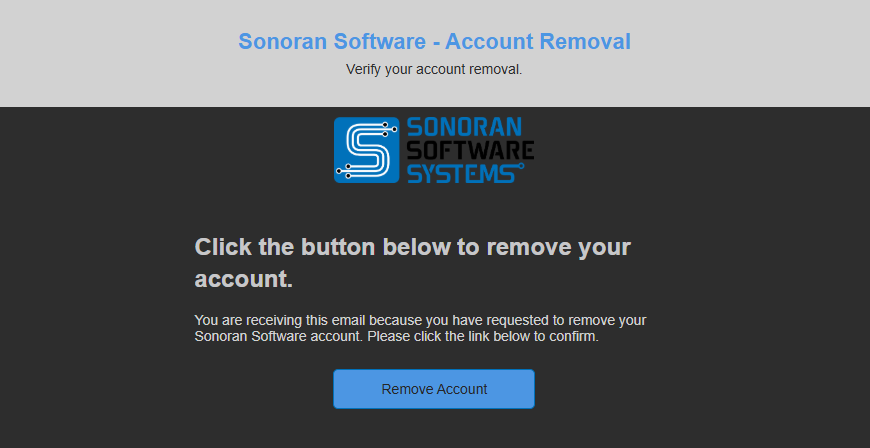
Check your account email for a confirmation notice from Sonoran Software. Click the link in the email to delete your account.
<figure><img src="/files/HxNi6wWP6QW5z3RFTz2a" alt="" width="375"><figcaption></figcaption></figure>

### Customer Support

Having trouble? [Contact our live chat support team](https://support.sonoransoftware.com/).

## Data Privacy

Upon account deletion, Sonoran Software removes private account data from the active account record, including the email address. We may retain limited internal identifiers, such as non-reversible account or security identifiers, where reasonably necessary to prevent abuse, enforce our Terms of Service, investigate fraud, or detect alternate account ban avoidance. Additional details are covered in our [Privacy Policy](/policy/policy/privacy-policy.md).

Deleting a Sonoran account does not automatically remove user-generated content stored in separate services or communities, such as Sonoran CAD, Sonoran CMS, Sonoran Radio, or support portal tickets. Those systems may retain community records, audit history, ticket history, or other user-submitted content according to their own operational needs, legal obligations, and our [Privacy Policy](/policy/policy/privacy-policy.md).


---

# Agent Instructions
This documentation is published with GitBook. GitBook is the documentation platform designed so that both humans and AI agents can read, navigate, and reason over technical content effectively. Learn more at gitbook.com.

## Querying This Documentation
If you need additional information that is not directly available in this page, you can query the documentation dynamically by asking a question.

Perform an HTTP GET request on the current page URL with the `ask` query parameter, and the optional `goal` query parameter:

```
GET https://docs.sonoransoftware.com/other/miscellaneous/delete-your-account.md?ask=<question>&goal=<endgoal>
```

`ask` is the immediate question: it should be specific, self-contained, and written in natural language.
`goal` is optional and describes the broader end goal you are ultimately trying to accomplish on behalf of the user. GitBook uses it to tailor the answer towards what is most useful for that goal.

The response will contain a direct answer to the question and relevant excerpts and sources from the documentation.

Use this mechanism when the answer is not explicitly present in the current page, you need clarification or additional context, or you want to retrieve related documentation sections.
