# Device In Use

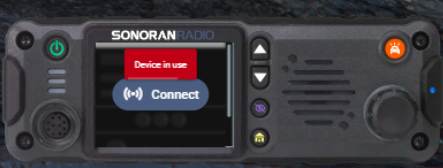
## Device In Use Error

<figure><img src="https://1542307009-files.gitbook.io/~/files/v0/b/gitbook-x-prod.appspot.com/o/spaces%2FfCk5zoeun5gx3ujYW6eg%2Fuploads%2Flci5hsZHKYeISdhr2S68%2Fimage.png?alt=media&#x26;token=fa1e2414-8875-4b85-990a-f9dbadd33e70" alt="" width="222"><figcaption><p>Sonoran Radio: Device In Use</p></figcaption></figure>

When connecting to the radio, your microphone may be locked in "exclusive mode" by another program.

### 1. Access the Sound Tab

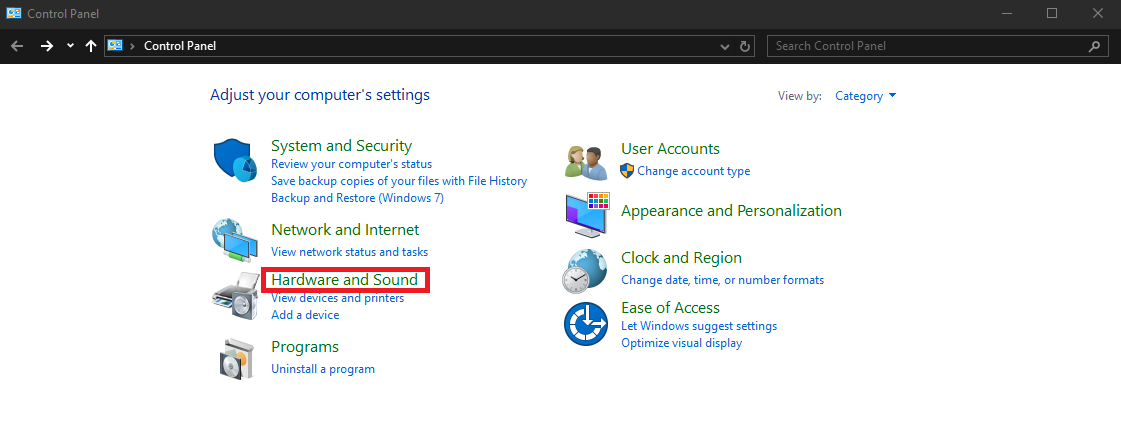
* Open the `Control Panel` and select `Hardware and Sound`
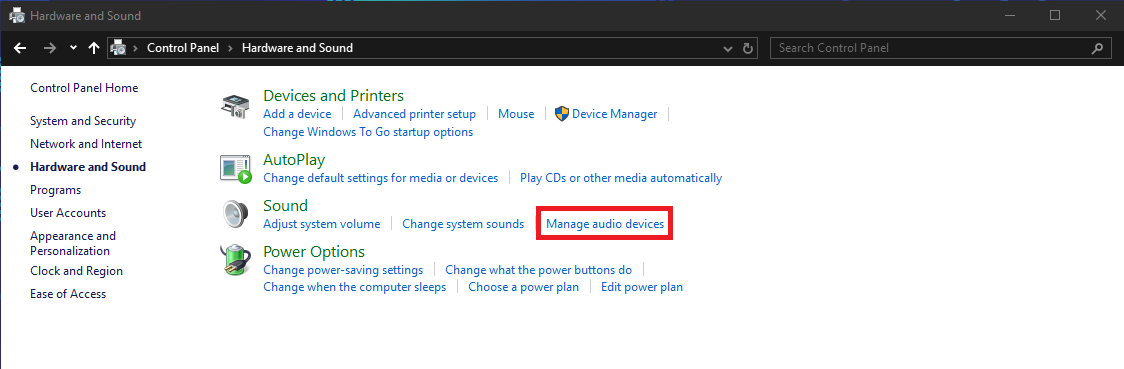
* Select `Manage Audio Devices`

<div><figure><img src="https://1542307009-files.gitbook.io/~/files/v0/b/gitbook-x-prod.appspot.com/o/spaces%2FfCk5zoeun5gx3ujYW6eg%2Fuploads%2F8qgBqxe9hhn4zpnovgZg%2Fimage.png?alt=media&#x26;token=ce89b12e-6f47-44d4-9ca8-54bd09c59c5c" alt="" width="375"><figcaption></figcaption></figure> <figure><img src="https://1542307009-files.gitbook.io/~/files/v0/b/gitbook-x-prod.appspot.com/o/spaces%2FfCk5zoeun5gx3ujYW6eg%2Fuploads%2Fq3uPVXfxNaK1mjhpeuSs%2Fimage.png?alt=media&#x26;token=30fefd48-34a0-4773-b5ff-fa82470bba0a" alt="" width="375"><figcaption></figcaption></figure></div>

### 2. Disable Exclusive Mode

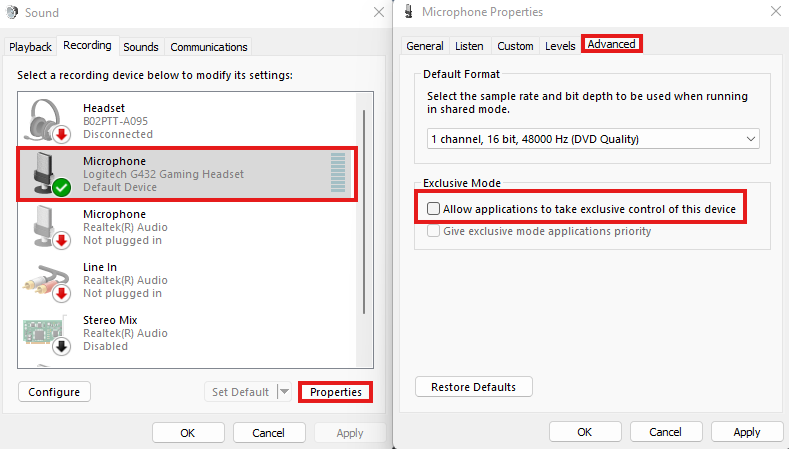
Select the microphone > `Properties` > `Advanced` > Disable (un-check) `Allow applications to take exclusive control of this device`.

<figure><img src="https://1542307009-files.gitbook.io/~/files/v0/b/gitbook-x-prod.appspot.com/o/spaces%2FfCk5zoeun5gx3ujYW6eg%2Fuploads%2FO4D07vFPTd6aiTqUNN3E%2Fimage.png?alt=media&#x26;token=7d9d2ac9-3964-4f42-9199-d1aa5c57d8f8" alt="" width="375"><figcaption><p>Sonoran Radio: Disable Exclusive Mic Mode</p></figcaption></figure>