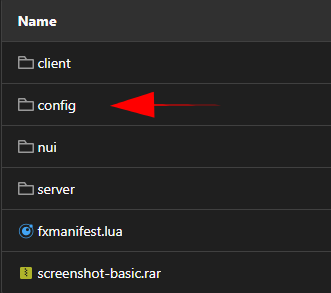
Config = {}
-- General Configuration Section --
Config.configuration_version = 1.1
Config.debug_mode = false -- Only useful for developers and if support asks you to enable it
Config.permissionMode = "ace" -- Available Options: ace, framework, custom
Config.auto_config = false

-- Ace Permissions Section --
Config.acePerms = {
    aceObjectPlace = "sonoran.atms", -- Select the ace for placing new ATM's and using admin repair
    aceObjectNotifications = "sonoran.police", -- Select the ace for receiving in-game notifications
    aceObjectCanSteal = "sonoran.theif", -- Select the ace for being allowed to steal ATM's
}

-- Framework Related Settings --
Config.framework = {
    frameworkType = "qb-core", -- This setting controls which framework is in use options are esx or qb-core
    policeJobNames = {"police"}, -- An array of job names that should receive notifications
    inventoryType = "normal", -- Which inventory you would like to use normal, quasar, ox_inventory (OX Will only work for ESX Legacy as of now)
    allowedToPlaceGroups = {"admin"}, -- The permission group that should be allowed to place new systems
    theifJobNames = {"unemployed"}, -- An array of job names that should receive notification_message
    useTheifJobListAsBlacklist = false, -- This will treat the theif job list as a blacklist rather than a whitelist
    reward = {
        amountRange = {10000, 20000}, -- The range of money they can recieve
        rewardType = "cash", -- The type of money they will recieve
        rewardItems = false,
        Items = {
            {item= "ITEM_NAME", amount = 3},
        }
    },
}

-- Configuration For Custom Permissions Handling --
Config.custom = {
    checkPermsServerSide = true, -- If true the permission event will be sent out to the server side resource, this is recommended
    permissionCheck = function(_, type) -- This function will always be called server side.
        if type == 0 then -- Check for admin
            return true or false -- Return true if they have admin, return false if they don't
        elseif type == 1 then -- Check for notification perms
            return true or false -- Return true if they have permissions, return false if they don't
        elseif type == 2 then -- Check for hacker perms
            return true or false -- Return true if they have permissions, return false if they don't
        elseif type == 3 then -- Check for repair perms
            return true or false -- Return true if they have permissions, return false if they don't
        end
    end
}

Config.atmModels = {
    ['old'] = -870868698,
    ['blue'] = -1126237515,
    ['red'] = -1364697528,
    ['green'] = 506770882
}

-- Choose Custom Command Names --
Config.commands = {
    placementGun = 'spawnnewatm', -- Command used to start the placement gun
    -- addWinch = 'addwinch', -- IN DEVELOPMENT
    -- removeWinch = 'removewinch', -- IN DEVELOPMENT
    withRope = 'attachrope', -- Command used to steal ATMs with rope
    drillATM = 'drillatm', -- Command used to initiate the final drilling into an atm
}

-- Feature Settings That Don't Require Other Resources --
Config.standaloneFeatures = {
    showNotificationBlipsForPolice = true, -- Should police see a blip when a car is pinged?
    blipsExpireAfterSeconds = 90, -- Number of seconds before the blip type above is removed
    enable_auto_update = true, -- Should the script automatically update itself, it will check for updates regardless
    delayForNotifyingStealing = 10000, -- Time in miliseconds between a successful hack and notification going out, set to 0 to disable delay
    distToDrill = 10, -- The distance a player must be from the inital location of the ATM robbery to begin drilling into the atm
}

--[[
    Placeholder list:
    {{POSTAL}} = Postal
    {{EVENT_TYPE}} = Event Type
    {{ATM_NAME}} = ATM Name
]]


-- Settings For Integrations With Other Resources --
Config.integration = {
    SonoranCAD_integration = {
        use = true, -- Should any of the options below be used? Integration with this script requires at least a Plus subscription.
        addLiveMapBlips = true, -- Should blips for the power systems be added to the live map? This requires the Pro SonoranCAD plan
        enable911Calls = true, -- Should 911 calls be generated in the CAD when a BOLO vehicle or speeder is detected?
        ["911_caller"] = "Automated ATM Alerts", -- Who should the 911 call appear to be from?
        ["911_message"] = "{{EVENT_TYPE}} Alert at ATM with name {{ATM_NAME}}", -- Configurable 911 call description
        nearestPostalPlugin = "nearest-postal", -- If you want to use postals, what is the exact name of your postals script?
        disableInGameWithDispatch = false, -- If true disables in-game notifications when dispatch is online in CAD
        disableCadWithoutDispatch = false -- If true disables CAD notifications when dispatch is offline in CAD
    }
}

-- Notification Settings --
Config.notifications = {
    type = "native", -- Available options: native, pNotify, okokNotify, or cadonly
    notificationTitle = "{{EVENT_TYPE}}", -- Notification Title for methods that support it
    -- Uncomment line below and comment line 105 if you plan to use pNotify
    -- notificationMessage = "<b>{{EVENT_TYPE}} Alert</b></br>Alert at ATM with name {{ATM_NAME}}"
    notificationMessage = "{{EVENT_TYPE}} Alert\nAlert at ATM with name {{ATM_NAME}}", -- The text of the notification
}

-- Vehicle Settings --
Config.vehicles = {
    ['DLOADER'] = {
        trunk = true,
        pull = true,
    },
    ['OPENWHEEL2'] = {
        trunk = false,
        pull = false,
    }
}

-- Translation Settings --
Config.lang = {
    general = {
        drillAtm = 'Press ~g~E ~w~to begin stealing the ATM',
        tooHot = 'The drill got too ~r~hot~w~ and broke!\nATM robbery ~r~failed~w~!',
        robCanceled = 'The ATM robbery was ~r~canceled~w~.',
        drillSuccess = 'The ATM has been successfully drilled into.\nReady for winch',
        inVeh = 'You get out of the vehicle to do this!',
        -- alrWinch = 'This vehicle already has a winch',
        -- winchAttach = 'The winch has been attached to this vehicle!',
        -- winchDetached = 'The winch has been detached from this vehicle!',
        -- noWinchDetected = 'This vehicle does not have a winch!',
        noVehNearby = 'There is no vehicle nearby!',
        noAtmNearby = 'There is no ATM nearby!',
        noAttachedAtm = 'There is no ATM attached!',
        loadAtm = 'Press ~g~H ~w~to load the ATM into your vehicle',
        unloadAtm = 'Press ~g~H ~w~to unload the ATM from your vehicle'
    },
    commands = {
        alrSpawning = '[Err] You are already spawning an ATM. Please cancel current spawn first!',
        atmPlaced = 'ATM Placed!',
        spawnNew = 'Spawn a new ATM and save it to the config based on pointing a gun',
        labelText = 'The label you want to apply to the shot spotter',
        atmTypes = 'The type of ATM model to spawn. (old, blue, red, green)',
        -- addWinch = 'Add a winch to your nearby vehicle', -- IN DEVELOPMENT
        -- removeWinch = 'Remove a winch to your nearby vehicle', -- IN DEVELOPMENT
        withRope = 'Use a rope to steal the ATM',
        drillATM = 'Initiate the final drilling into the ATM'

    },
    cadCall = {
        callDesc = 'This is an automated call from an ATM alarm',
        callerName = 'Automated ATM Alarm'
    }
}


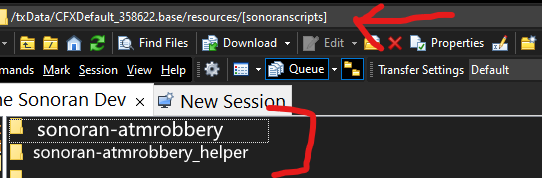 Sonoran Software - ATM Robbery - Folders