

> For the complete documentation index, see [llms.txt](https://docs.sonoransoftware.com/llms.txt). Markdown versions of documentation pages are available by appending `.md` to page URLs; this page is available as [Markdown](https://docs.sonoransoftware.com/cad/api-integration/api-endpoints-v2/integration-panels/examples/fleet-management.md).

# Fleet Management

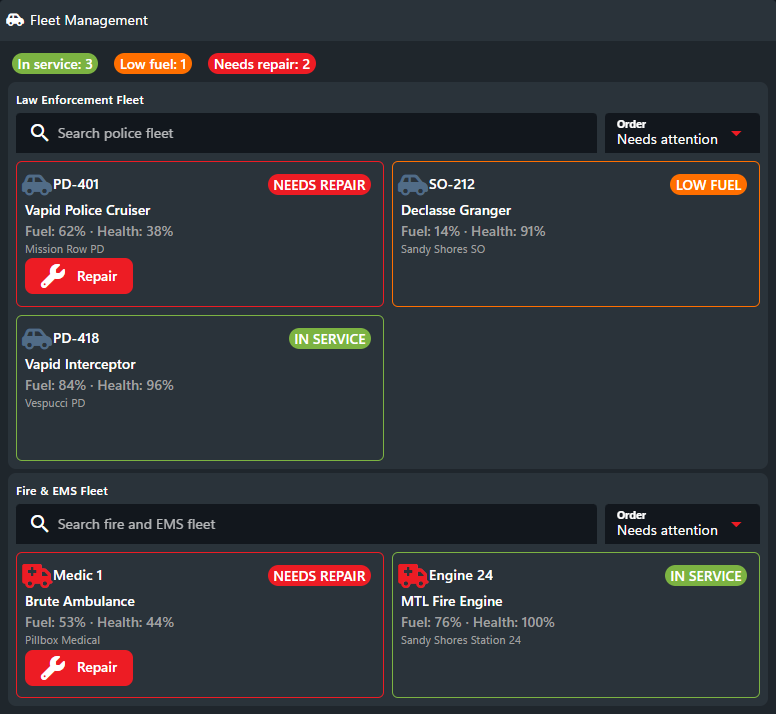
Separate law enforcement and fire/EMS fleets, display fuel and health, highlight vehicles that need attention, and request repairs.

This example connects an existing garage or fleet resource to CAD. Police, fire, and EMS vehicles are grouped by fleet and show their fuel, health, station, and service state. Damage, refueling, spawning, and repairs performed in-game update CAD, while a CAD user can send a repair request back to the resource.

![Fleet Management custom integration panel](https://232668649-files.gitbook.io/~/files/v0/b/gitbook-x-prod.appspot.com/o/spaces%2F-M4pGN81fb4R6zFhodcu%2Fuploads%2Fgit-blob-6299a55876066f2f6cc760317d7d87a1fd0304b8%2Ffleet-management.png?alt=media)

## How It Connects

1. Install or update the panel definition when the resource is configured.
2. On resource start, read the fleet database or garage resource and publish the complete state.
3. Publish again when a vehicle is spawned, stored, damaged, refueled, repaired, or moved between service states.
4. Poll for `fleet.repair` actions. Apply them through the fleet resource, acknowledge them, then republish the authoritative vehicle condition.

## Game-Side Outline

The following is server-side pseudocode. Adapt the events and function names to your fleet resource and preferred [API library](/cad/api-integration/api-endpoints-v2/integration-panels.md#sdk-helpers).

```lua
onResourceStart(function()
  setIntegrationPanel("example.fleet-management", definition)
  publishPanelState(readFleetVehiclesByType())
end)

-- Publish after garage, fuel, health, or service-state changes.
onFleetVehicleChanged(function()
  publishPanelState(readFleetVehiclesByType())
end)

everySecond(function()
  local response = pollPanelActions({ after = cursor })

  for _, event in ipairs(response.events) do
    local success = fleetResource.repairVehicle(event.values.vehicleId)

    acknowledgePanelAction(event.id, success)
    publishPanelState(readFleetVehiclesByType())
  end

  cursor = response.nextCursor -- Persist after every returned action is acknowledged.
end)
```

See [Set State](/cad/api-integration/api-endpoints-v2/integration-panels/set-state.md), [Poll Actions](/cad/api-integration/api-endpoints-v2/integration-panels/poll-actions.md), and [Acknowledge Action](/cad/api-integration/api-endpoints-v2/integration-panels/acknowledge-action.md) for copyable calls in every supported library.

## Actions

| Action ID      | Purpose                            |
| -------------- | ---------------------------------- |
| `fleet.repair` | Repair the selected fleet vehicle. |

## Definition JSON

[Open the raw definition](https://github.com/Sonoran-Software/SonoranCAD-Documentation/tree/master/api-integration/api-endpoints-v2/integration-panels/examples/json/fleet-management-definition.json)

<details>

<summary>Copy the complete definition</summary>

```json
{
  "schemaVersion": 1,
  "key": "example.fleet-management",
  "name": "Fleet Management",
  "icon": "fas fa-car-side",
  "surfaces": ["dispatch", "police", "fire", "ems"],
  "body": [
    {
      "type": "row",
      "gap": "sm",
      "children": [
        { "type": "badge", "label": "In service: {{state.summary.inService}}", "appearance": "positive" },
        { "type": "badge", "label": "Low fuel: {{state.summary.lowFuel}}", "appearance": "warning" },
        { "type": "badge", "label": "Needs repair: {{state.summary.needsRepair}}", "appearance": "primary" }
      ]
    },
    {
      "type": "section",
      "title": "Law Enforcement Fleet",
      "children": [
        {
          "type": "repeat",
          "source": "$state.policeVehicles",
          "emptyText": "No law enforcement vehicles",
          "layout": "grid",
          "minItemWidth": 255,
          "gap": "sm",
          "search": { "placeholder": "Search police fleet", "fields": ["unit", "model", "station", "status"] },
          "sort": {
            "label": "Order",
            "default": "condition",
            "options": [
              { "label": "Needs attention", "value": "condition", "rules": [{ "path": "conditionRank", "direction": "asc" }, { "path": "unit", "direction": "asc" }] },
              { "label": "Unit A-Z", "value": "unit", "rules": [{ "path": "unit", "direction": "asc" }] },
              { "label": "Fuel low-high", "value": "fuel", "rules": [{ "path": "fuel", "direction": "asc" }] }
            ]
          },
          "children": [
            {
              "type": "section",
              "style": { "borderColor": "$item.color", "borderStyle": "solid", "borderWidth": "1px", "borderRadius": "6px", "minHeight": "146px" },
              "children": [
                { "type": "row", "align": "center", "children": [
                  { "type": "icon", "icon": "fas fa-car-side", "color": "blue" },
                  { "type": "text", "text": "$item.unit", "variant": "title", "grow": true },
                  { "type": "badge", "label": "$item.status", "appearance": "$item.appearance" }
                ] },
                { "type": "text", "text": "$item.model" },
                { "type": "text", "text": "Fuel: {{item.fuel}}% · Health: {{item.health}}%", "appearance": "muted" },
                { "type": "text", "text": "$item.station", "variant": "caption", "appearance": "muted" },
                { "type": "button", "label": "Repair", "icon": "fas fa-wrench", "appearance": "primary", "visibleWhen": { "path": "$item.needsRepair", "equals": true }, "action": { "id": "fleet.repair", "values": { "vehicleId": "$item.id" } } }
              ]
            }
          ]
        }
      ]
    },
    {
      "type": "section",
      "title": "Fire & EMS Fleet",
      "children": [
        {
          "type": "repeat",
          "source": "$state.fireVehicles",
          "emptyText": "No fire or EMS vehicles",
          "layout": "grid",
          "minItemWidth": 255,
          "gap": "sm",
          "search": { "placeholder": "Search fire and EMS fleet", "fields": ["unit", "model", "station", "status"] },
          "sort": {
            "label": "Order",
            "default": "condition",
            "options": [
              { "label": "Needs attention", "value": "condition", "rules": [{ "path": "conditionRank", "direction": "asc" }, { "path": "unit", "direction": "asc" }] },
              { "label": "Unit A-Z", "value": "unit", "rules": [{ "path": "unit", "direction": "asc" }] },
              { "label": "Fuel low-high", "value": "fuel", "rules": [{ "path": "fuel", "direction": "asc" }] }
            ]
          },
          "children": [
            {
              "type": "section",
              "style": { "borderColor": "$item.color", "borderStyle": "solid", "borderWidth": "1px", "borderRadius": "6px", "minHeight": "146px" },
              "children": [
                { "type": "row", "align": "center", "children": [
                  { "type": "icon", "icon": "fas fa-truck-medical", "color": "primary" },
                  { "type": "text", "text": "$item.unit", "variant": "title", "grow": true },
                  { "type": "badge", "label": "$item.status", "appearance": "$item.appearance" }
                ] },
                { "type": "text", "text": "$item.model" },
                { "type": "text", "text": "Fuel: {{item.fuel}}% · Health: {{item.health}}%", "appearance": "muted" },
                { "type": "text", "text": "$item.station", "variant": "caption", "appearance": "muted" },
                { "type": "button", "label": "Repair", "icon": "fas fa-wrench", "appearance": "primary", "visibleWhen": { "path": "$item.needsRepair", "equals": true }, "action": { "id": "fleet.repair", "values": { "vehicleId": "$item.id" } } }
              ]
            }
          ]
        }
      ]
    }
  ]
}
```

</details>

## Example State

[Open the raw state](https://github.com/Sonoran-Software/SonoranCAD-Documentation/tree/master/api-integration/api-endpoints-v2/integration-panels/examples/json/fleet-management-state.json)

<details>

<summary>Copy the example state</summary>

```json
{
  "summary": { "inService": 3, "lowFuel": 1, "needsRepair": 2 },
  "policeVehicles": [
    { "id": "pd-401", "unit": "PD-401", "model": "Vapid Police Cruiser", "station": "Mission Row PD", "status": "NEEDS REPAIR", "fuel": 62, "health": 38, "needsRepair": true, "conditionRank": 0, "color": "primary", "appearance": "primary" },
    { "id": "pd-418", "unit": "PD-418", "model": "Vapid Interceptor", "station": "Vespucci PD", "status": "IN SERVICE", "fuel": 84, "health": 96, "needsRepair": false, "conditionRank": 2, "color": "positive", "appearance": "positive" },
    { "id": "so-212", "unit": "SO-212", "model": "Declasse Granger", "station": "Sandy Shores SO", "status": "LOW FUEL", "fuel": 14, "health": 91, "needsRepair": false, "conditionRank": 1, "color": "amber", "appearance": "warning" }
  ],
  "fireVehicles": [
    { "id": "e24", "unit": "Engine 24", "model": "MTL Fire Engine", "station": "Sandy Shores Station 24", "status": "IN SERVICE", "fuel": 76, "health": 100, "needsRepair": false, "conditionRank": 2, "color": "positive", "appearance": "positive" },
    { "id": "m1", "unit": "Medic 1", "model": "Brute Ambulance", "station": "Pillbox Medical", "status": "NEEDS REPAIR", "fuel": 53, "health": 44, "needsRepair": true, "conditionRank": 0, "color": "primary", "appearance": "primary" }
  ]
}
```

</details>


---

# Agent Instructions
This documentation is published with GitBook. GitBook is the documentation platform designed so that both humans and AI agents can read, navigate, and reason over technical content effectively. Learn more at gitbook.com.

## Querying This Documentation
If you need additional information that is not directly available in this page, you can query the documentation dynamically by asking a question.

Perform an HTTP GET request on the current page URL with the `ask` query parameter, and the optional `goal` query parameter:

```
GET https://docs.sonoransoftware.com/cad/api-integration/api-endpoints-v2/integration-panels/examples/fleet-management.md?ask=<question>&goal=<endgoal>
```

`ask` is the immediate question: it should be specific, self-contained, and written in natural language.
`goal` is optional and describes the broader end goal you are ultimately trying to accomplish on behalf of the user. GitBook uses it to tailor the answer towards what is most useful for that goal.

The response will contain a direct answer to the question and relevant excerpts and sources from the documentation.

Use this mechanism when the answer is not explicitly present in the current page, you need clarification or additional context, or you want to retrieve related documentation sections.
