

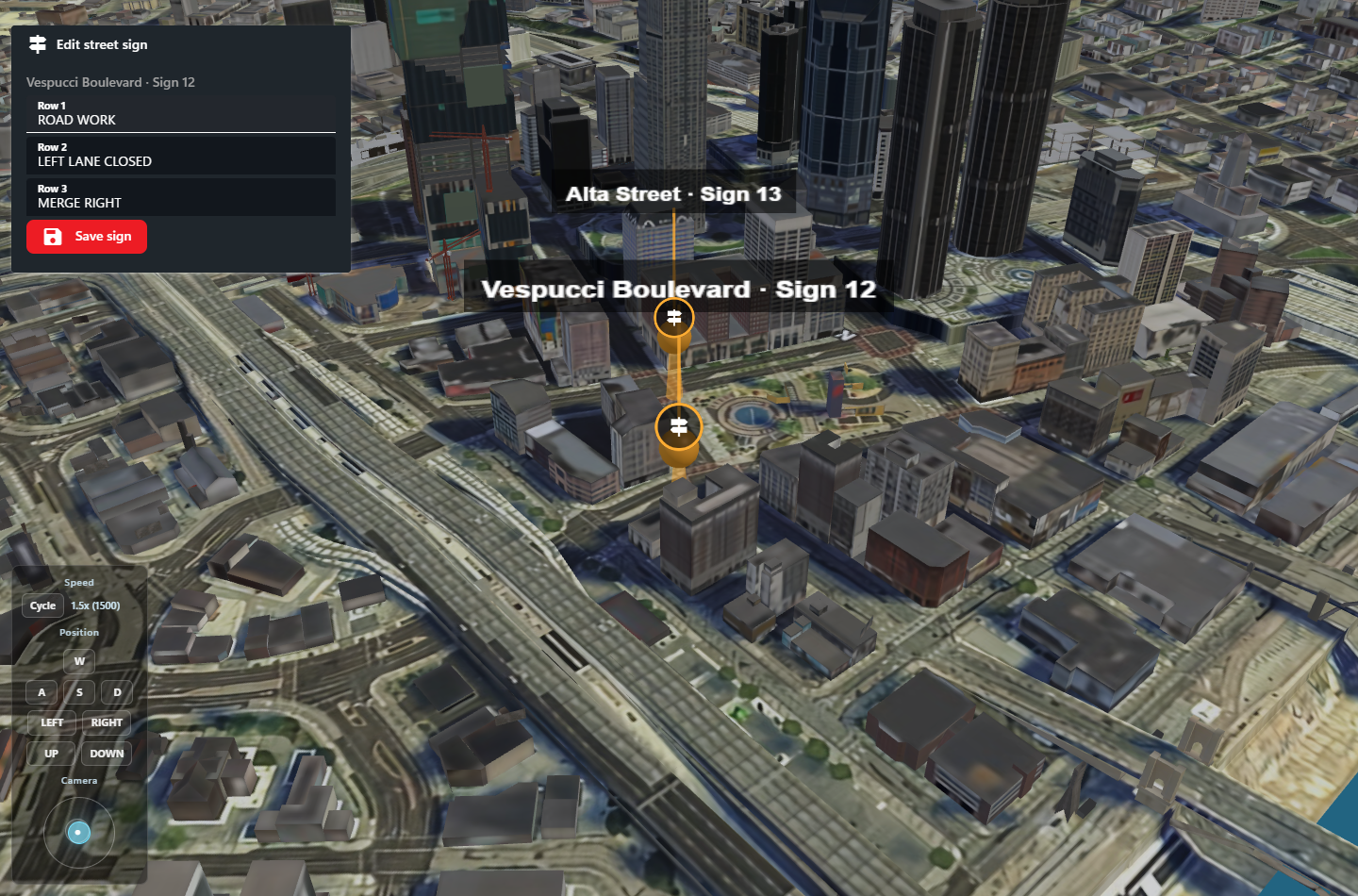
 Local CAD preview using sample sign data.
- Define the sign editor
Send the following body to PUT /v2/integration-panels/smart-signs using Set Panel. All SDKs expose setIntegrationPanelV2.
surfaces: [] keeps these individual editors out of the layout’s Add Window list. It does not prevent explicit blip references. Use a separate overview panel, such as smart-signs-overview, with surfaces: ["dispatch", "police"] and a repeated list for the full sign management window. Publish changes to both the overview state and the affected editor instance.
- Publish the sign’s current text
Use Set State, PUT /v2/integration-panels/servers/1/panels/smart-signs/instances/sign-12/state:
- Attach the editor to a blip
Use Sonoran.Net 0.1.40 or newer for the typed BlipDisplayDataV2.PanelKey and .InstanceKey properties. Lua, JavaScript, and Python accept these fields through their existing v2 blip helpers.
Use Create Blip, POST /v2/emergency/servers/1/blips:
data entry can contain ordinary title/text information or a panelKey/instanceKey reference. An optional title on a panel entry overrides its menu heading. If panelKey is present, that entry renders the panel instead of text. Multiple entries render in array order.
Panel and instance keys use 2–80 lowercase letters, digits, dots, underscores, or hyphens and start with a letter or digit. Publish the definition and instance before using the blip. Missing definitions or instances show an unavailable message; CAD never substitutes another sign’s instance. The existing community/server permissions for Integration Panels still apply.
surfaces controls layout placement, not authorization.
To change the reference, Update Blip with a complete replacement data array. To remove all menu content, send "data": []. To remove only a panel, resend the ordinary information entries you want to retain. Unrelated blip PATCH fields leave data unchanged.
- Apply Save actions in your integration
Receive EVENT_PANEL_SMART-SIGNS through the existing FiveM action push hook. Its data contains the Save action below. Use Actions only for slow backup polling, budgeting three requests per minute per API key across all panels and servers:
instanceKey to select the sign. Save includes the displayed defaults for untouched fields and preserves deliberate empty strings. Inputs without an action collect edits locally; the button sends all three rows together.
- Validate the actor, sign, allowed action, text lengths, and supported characters against your game resource’s rules.
- Apply the change to the sign in-game. Handle repeated event delivery idempotently using the event ID.
- Acknowledge the event as successful or failed, with a useful message.
- On success, publish the complete resulting state for
sign-12and your overview panel.
id, and do not advance the backup polling cursor from a push.
Save one sign in a repeated overview
For an overview that renders many signs inside arepeat, avoid "values": "$inputs": that contains every sign’s form and can exceed the 32 KiB action limit. Use the item bindings in the Manifest Reference. These bindings are currently available on staging; deploy/reload the supporting CAD frontend before updating the manifest.
For example, publish state as { "signs": [{ "id": "sign-12", "line1": "ROAD WORK", "line2": "LEFT LANE CLOSED", "line3": "MERGE RIGHT" }] } and use this overview body:
values: { "signId": "sign-12", "changes": { "line2": "RIGHT LANE CLOSED" } }. Clearing Row 2 produces "line2": "". Missing rows mean unchanged; do not replace them with empty strings. Validate the sign and field IDs, merge the allowed changes into the current game-side sign, acknowledge the action, and publish the complete resulting state. An empty changes object is a successful no-op.
If your existing handler requires all three rows, use "values": { "signId": "$item.id", "fields": "$itemInputs" } and read action.values.fields. This includes the selected sign’s defaults and edits without including other signs. The per-sign live-map editor above already sends only its three explicitly selected inputs and needs no manifest change.
Keep push delivery primary and polling as slow recovery. Partial action values do not change the Set State endpoint: publish a complete overview state and the affected individual editor state after a successful save. A revision for one saved sign preserves other unsaved drafts when their published control defaults are unchanged.