

> For the complete documentation index, see [llms.txt](https://docs.sonoransoftware.com/llms.txt). Markdown versions of documentation pages are available by appending `.md` to page URLs; this page is available as [Markdown](https://docs.sonoransoftware.com/store/cctv/configuration.md).

# Configuration

Configure CCTV interaction, cameras, recordings, retention, permissions, and optional integrations.

CCTV ships with conservative defaults and does not require a roleplay framework. It still requires the free Events Core package. Test configuration changes before using the system for production evidence workflows.

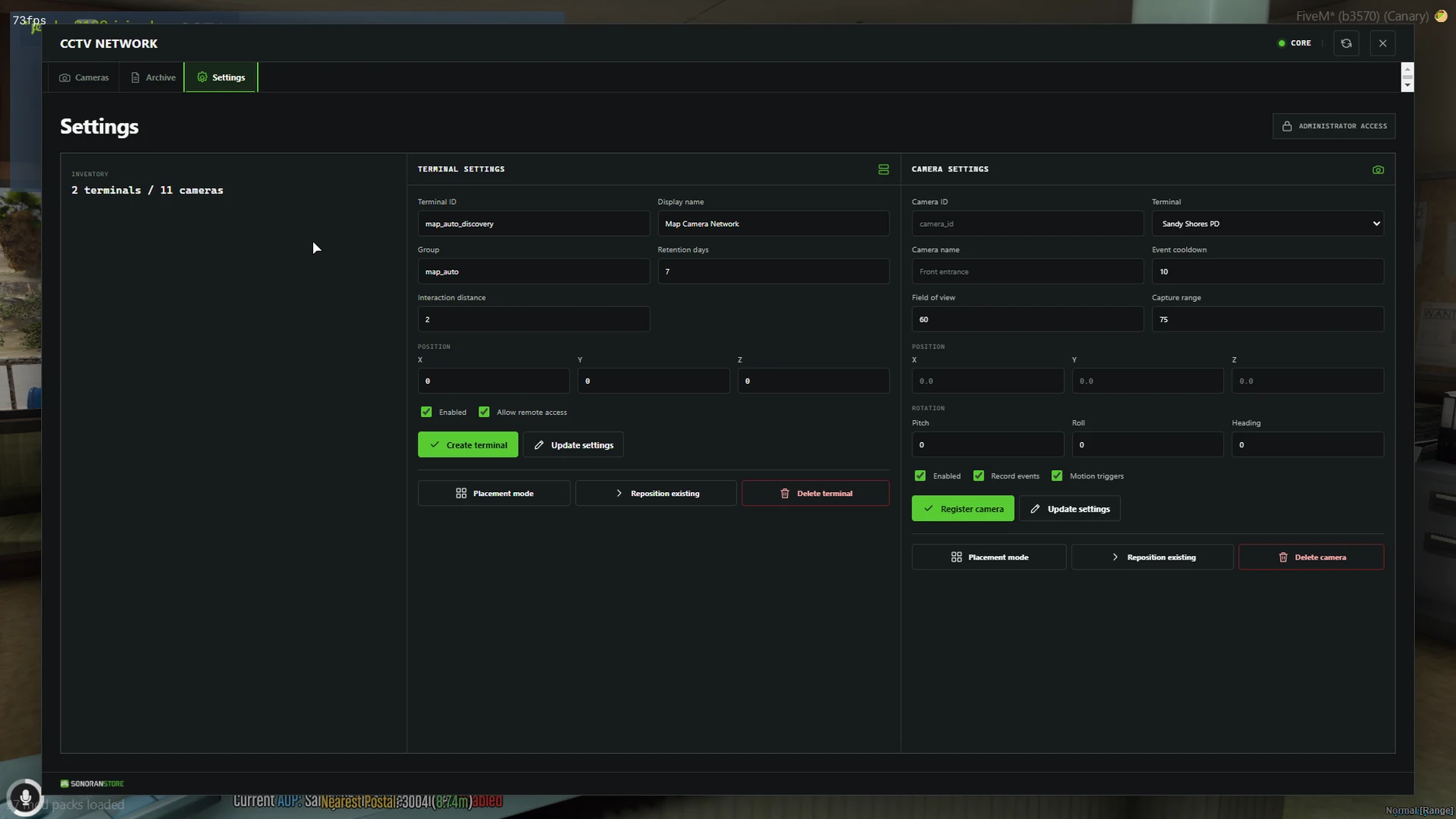
<figure><img src="https://954277862-files.gitbook.io/~/files/v0/b/gitbook-x-prod.appspot.com/o/spaces%2FA1LA3ay59CDyDKnfXPfc%2Fuploads%2Fgit-blob-b239d5a8e0c506f92e9814dd0696f5c9385c9644%2Fcctv-settings.webp?alt=media" alt="CCTV terminal and camera settings screen"><figcaption><p>Administrators can manage terminals, cameras, capture settings, and placement from the CCTV interface.</p></figcaption></figure>

## Configuration files

### Events Core

| File                               | Purpose                                                                                            |
| ---------------------------------- | -------------------------------------------------------------------------------------------------- |
| eventsCore/config/config.lua       | Framework context, recording limits, pre-event and post-event timing, replay limits, and retention |
| eventsCore/config/storage.lua      | Local storage limits and optional allowed playback hosts                                           |
| eventsCore/config/permissions.lua  | Permission behavior and trusted helper resources                                                   |
| eventsCore/config/integrations.lua | Optional Discord settings                                                                          |

### CCTV

| File                              | Purpose                                                                            |
| --------------------------------- | ---------------------------------------------------------------------------------- |
| eventsCctv/config/config.lua      | Interaction, live view, remote access, motion detection, overlays, and persistence |
| eventsCctv/config/cameras.lua     | Camera defaults, models, presets, and optional map-camera discovery                |
| eventsCctv/config/permissions.lua | CCTV ACE nodes and terminal access prefixes                                        |
| eventsCctv/config/remote.lua      | Server-only allowlist for trusted remote integrations                              |
| eventsCctv/config/update.lua      | Informational update-check toggle                                                  |

Keep API tokens, Discord webhooks, and private endpoints in server-only files. Never place credentials in client configuration or NUI files.

## Important shipped defaults

| Setting                        | Default                                               |
| ------------------------------ | ----------------------------------------------------- |
| Interaction mode               | Text interaction with supported target-system options |
| Terminal model                 | prop\_monitor\_01c                                    |
| Interaction distance           | 2 metres                                              |
| Camera model                   | prop\_cctv\_cam\_01a                                  |
| Camera field of view           | 60 degrees                                            |
| Camera capture range           | 75 metres                                             |
| Motion polling                 | Every 500 ms                                          |
| Motion cooldown                | 10 seconds per entity                                 |
| Minimum motion                 | 0.75 metres                                           |
| Pre-event / post-event context | 15 seconds each                                       |
| Recording retention            | 7 days by default                                     |
| Maximum configured retention   | 90 days                                               |
| Maximum live viewers           | 8 per camera                                          |
| Remote-view session            | 300 seconds                                           |
| Persistence                    | Enabled at eventsCctv/data/cctv.json                  |
| Night vision                   | Enabled                                               |
| Thermal mode                   | Disabled                                              |

## Framework selection

Events Core is standalone by default. Set its supported framework option to esx, qbcore, qbox, or automatic detection only when that framework is available on the server. ACE remains the default permission source.

## Recording and retention

Events Core stores the incident data used for historic playback under eventsCore/data/recordings by default. CCTV stores terminal and camera configuration in eventsCctv/data/cctv.json.

Measure available disk space and establish a backup policy before increasing retention. Recordings can contain player, vehicle, and incident information.

## Optional integrations

Discord, remote viewing, external storage, and recording uploads are optional and disabled or restricted by default. Enable one integration at a time on a test server, keep credentials server-side, and grant only the required permissions.

## Map and MLO cameras

Automatic discovery of compatible camera props is disabled by default. Configure and verify a manual camera first, then follow [Camera Setup](/store/cctv/camera-setup.md#automatic-map-and-mlo-cameras) before enabling discovery.


---

# Agent Instructions
This documentation is published with GitBook. GitBook is the documentation platform designed so that both humans and AI agents can read, navigate, and reason over technical content effectively. Learn more at gitbook.com.

## Querying This Documentation
If you need additional information that is not directly available in this page, you can query the documentation dynamically by asking a question.

Perform an HTTP GET request on the current page URL with the `ask` query parameter, and the optional `goal` query parameter:

```
GET https://docs.sonoransoftware.com/store/cctv/configuration.md?ask=<question>&goal=<endgoal>
```

`ask` is the immediate question: it should be specific, self-contained, and written in natural language.
`goal` is optional and describes the broader end goal you are ultimately trying to accomplish on behalf of the user. GitBook uses it to tailor the answer towards what is most useful for that goal.

The response will contain a direct answer to the question and relevant excerpts and sources from the documentation.

Use this mechanism when the answer is not explicitly present in the current page, you need clarification or additional context, or you want to retrieve related documentation sections.
