

For the complete documentation index, see llms.txt. This page is also available as Markdown.

Configuration

Configure Dashcam branding, capture settings, triggers, vehicles, retention, permissions, and optional integrations.

Dashcam ships with usable defaults and can run without a roleplay framework. It still requires the free Events Core package. Test changes on a non-production server before using the system for evidence workflows.

Configuration files

Events Core

File
Purpose

eventsCore/config/config.lua

Framework selection, recording limits, replay speeds, processing, retention, and audit settings

eventsCore/config/storage.lua

Local storage limits and optional allowed playback hosts

eventsCore/config/permissions.lua

Permission behavior and trusted processing resources

eventsCore/config/integrations.lua

Optional CAD and Discord settings

Dashcam

File
Purpose

eventsDashcam/config/config.lua

Branding, capture range, timing, triggers, keys, integrations, and request limits

eventsDashcam/config/cameras.lua

The six replay viewpoints, offsets, rotations, and fields of view

eventsDashcam/config/vehicles.lua

Eligible vehicle classes, models, plates, jobs, fleets, and inventory item

eventsDashcam/config/retention.lua

Retention days for each evidence classification

eventsDashcam/config/permissions.lua

Dashcam ACE nodes and framework job-grade rules

eventsDashcam/config/update.lua

Informational update-check toggle

eventsDashcam/integrations/

Optional dispatch, inventory, phone, voice-metadata, CAD, Discord, and clip-provider bridges

Keep API tokens, Discord webhooks, and private endpoints in server-only files. Never place credentials in client configuration or NUI files.

Important shipped defaults

Setting
Default

Capture radius

85 metres around the vehicle

Pre-event context

60 seconds

Automatic post-event time

20 seconds

Maximum manual recording

1,800 seconds (30 minutes)

Replay views

Front, rear, cabin, prisoner, left, and right

Open terminal

F7

Start or stop recording

F9

Add evidence marker

F10

Trigger polling

Every 500 ms

Emergency lights, siren, and gunshot triggers

Enabled

Collision threshold

35 points of vehicle body-health loss

Speed threshold

44.7 m/s, approximately 100 mph or 161 km/h

Speed-trigger cooldown

30 seconds

CAD and Discord actions

Disabled

Automatic update check

Disabled

Branding and units

Config.Brand controls the department name, product name, accent color, speed unit, timezone label, and privacy disclosure. SpeedUnit supports the shipped mph behavior or km/h presentation. The trigger threshold in Config.Triggers.SpeedMps is always configured in metres per second.

Framework selection

Events Core is standalone by default. Set its supported framework option to esx, qbcore, qbox, or automatic detection only when that framework is installed and available. Framework jobs can provide standard or elevated Dashcam actions using the grade tables in eventsDashcam/config/permissions.lua.

Recording and storage

Events Core stores the incident data used for historic replay under eventsCore/data/recordings by default. Measure available disk space and establish a backup policy before raising capture limits or retention periods. Recordings can contain player, vehicle, location, and incident information.

Optional integrations

CAD, Discord, dispatch, phone, inventory, voice metadata, and generated clips require separate configuration. Their shipped bridges are disabled, empty, or metadata-only until you connect a compatible system. Enable one integration at a time on a test server and keep credentials server-side.

Dashcam's standard historic replay works without an encoded video file. Any separate video-generation or upload workflow requires a compatible, trusted recorder or processing setup in Events Core.
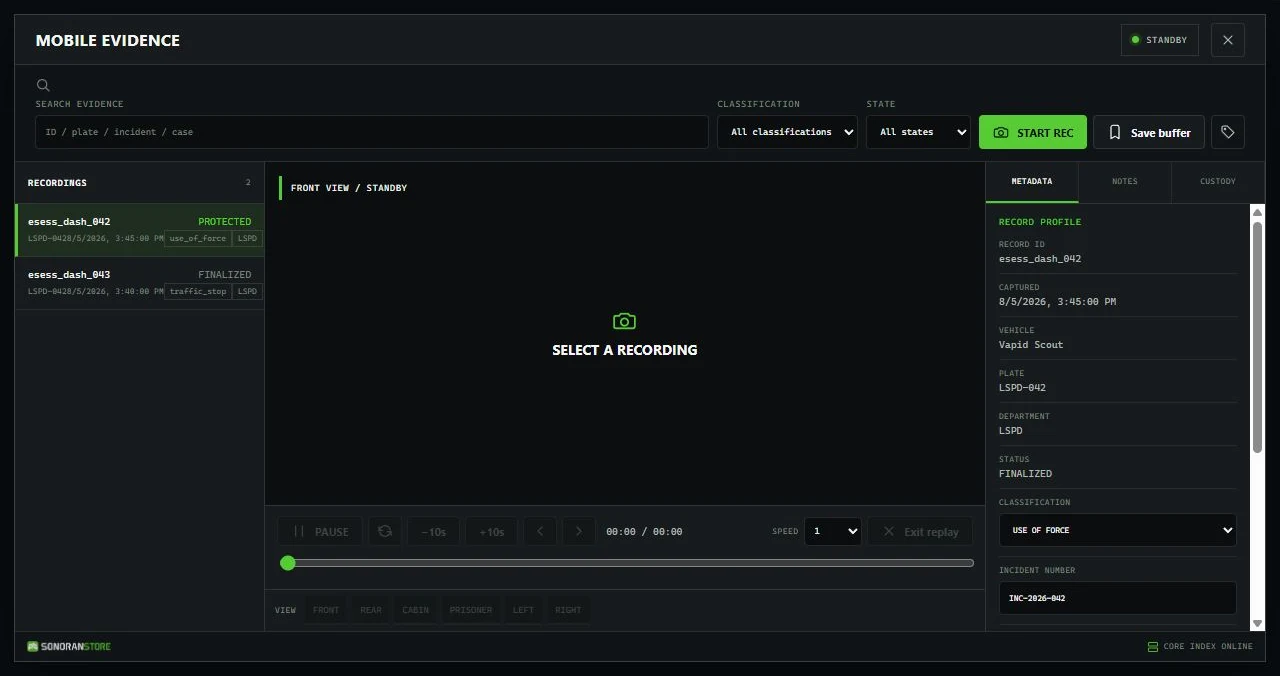
Dashcam Mobile Evidence terminal showing recordings, search, filters, and evidence details
The Mobile Evidence terminal keeps recording controls, searchable evidence, replay, and record details in one interface.

Last updated

Was this helpful?