# Registering Your Account

### 1. Navigate to the Login Page

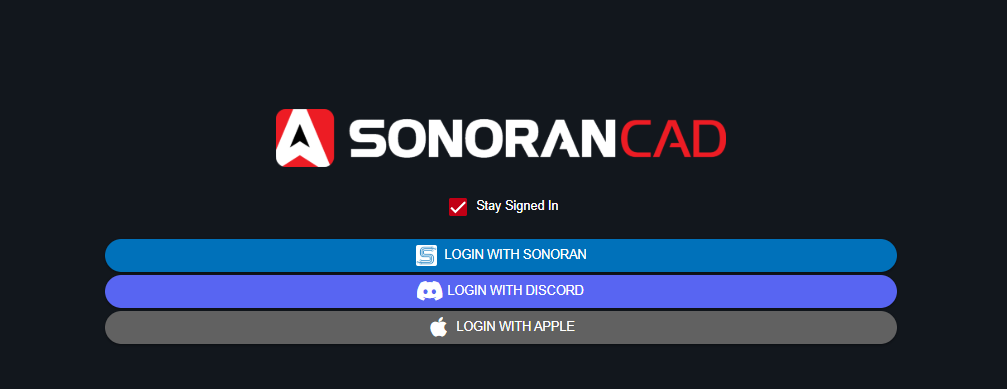
On the website or app, select one of the login options:
<figure><img src="https://232668649-files.gitbook.io/~/files/v0/b/gitbook-x-prod.appspot.com/o/spaces%2F-M4pGN81fb4R6zFhodcu%2Fuploads%2FHU0pTivNLgzeS9waLq6a%2Fimage.png?alt=media&#x26;token=807fd38f-5a94-4a3a-a6e6-5436a2f304e7" alt=""><figcaption></figcaption></figure>

Users can register a Sonoran Software account at [account.sonoransoftware.com](https://account.sonoransoftware.com/).

### 2. Verify Your Email Address

{% hint style="warning" %}
Account verification emails may not be shown in your primary inbox.

If you're having trouble finding the email, check your spam, junk, promotions, or all mail folder.
{% endhint %}

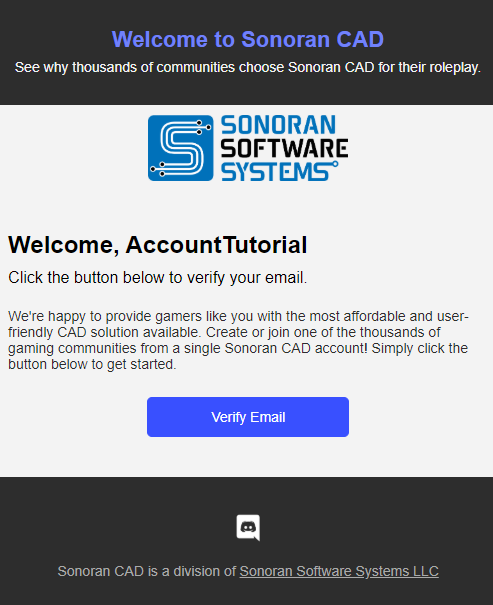
If you've registered a new account, check your inbox for an email from Sonoran CAD.\
\
Select the "Verify Email" button, and your account will be automatically verified.<br>

![Account verification emails are sent as shown above](https://232668649-files.gitbook.io/~/files/v0/b/gitbook-legacy-files/o/assets%2F-M4pGN81fb4R6zFhodcu%2F-M4pg_ssMzahVpv3KR3-%2F-M4pig1M8X318nJVTvIb%2Femail.PNG?alt=media\&token=78e7bf7b-da4b-41c1-b8d1-2c744edf5f5b)