# Registering Your Community

*NOTE:* If you have not already, you will need to [create a user account](https://docs.sonoransoftware.com/cad/tutorials/getting-started/registering-your-account) with Sonoran CAD.

#### 1. Enter In Your Community Information

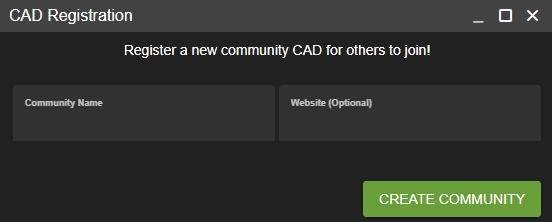
Once logged in, press "Create Community" on the community selection menu.\
You will be prompted for three information fields:

1. Community Name
2. Website (Optional)

<figure><img src="https://232668649-files.gitbook.io/~/files/v0/b/gitbook-x-prod.appspot.com/o/spaces%2F-M4pGN81fb4R6zFhodcu%2Fuploads%2FqprYUeoeMi1zCcUhW72L%2Fimage.png?alt=media&#x26;token=6ecfe22c-770f-490e-a2e0-2d2a7f154ecb" alt=""><figcaption></figcaption></figure>

**2. Register Your Community**\
\
Once you've filled out the information, press "Register Community" to create your CAD.\
\
Your community icon will now be displayed under the "My Communities" section. You can click on this to log into your new CAD.