

# Configurable Hotkeys

{% hint style="warning" %}
Configurable hotkeys are not included with the free version.\
For more information, see our [pricing](https://docs.sonoransoftware.com/cad/pricing/faq) or view how to check your community [limits](https://docs.sonoransoftware.com/cad/tutorials/getting-started/view-your-limits).
{% endhint %}

{% hint style="info" %}
Hotkeys are enabled **globally** on the [Desktop ](https://docs.sonoransoftware.com/cad/download)application. This means users do not have to have the app or page in focus or visible for the hotkeys to be registered.

For desktop users, we **highly recommend** viewing our [guide on in-game use](https://docs.sonoransoftware.com/cad/download/steam-browser-workaround)!
{% endhint %}

### Configure your Hotkeys

In the side menu, open the "Settings" modal to display your hotkey configuration menu.\
Here, you can configure your prefix and hotkey buttons using the drop-downs below.

Once changed, your settings are automatically applied and saved.
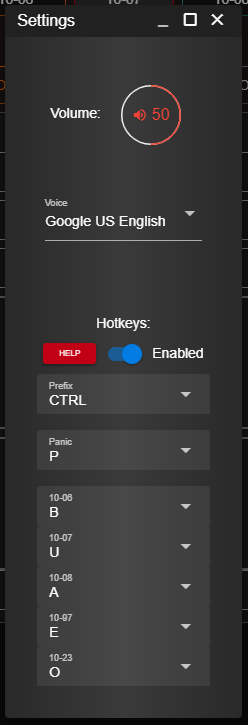
![Sonoran CAD's hotkey configuration menu](https://232668649-files.gitbook.io/~/files/v0/b/gitbook-legacy-files/o/assets%2F-M4pGN81fb4R6zFhodcu%2F-M5VzW8LGut7Cre9f4D3%2F-M5VzyyArIfBjh4RoOq2%2Fhotkeys.PNG?alt=media\&token=9b7a1039-ac32-4b7b-a662-f604aba036d6)

{% hint style="info" %}
*Note:* This image also displays [custom unit status options](https://docs.sonoransoftware.com/cad/tutorials/customization/unit-status-codes), and may differ slightly from your view.
{% endhint %}
