# Job Sync

This resource is a in-game way of automatically syncing jobs and ranks to match roster information in the Sonoran CMS system/community.

{% hint style="warning" %}
At this time, the Job Sync module only works with [QBCore and Qbox servers](https://docs.sonoransoftware.com/cms/integration-capabilities/fivem-game-panel/qbcore-and-qbox-panel).
{% endhint %}

## Installation / Configuration

{% hint style="info" %}
With core version `v1.4.2` the Job Sync resource was converted to a core module and no longer requires manual installation just configuration.
{% endhint %}

### 1. Configure Job Sync Module

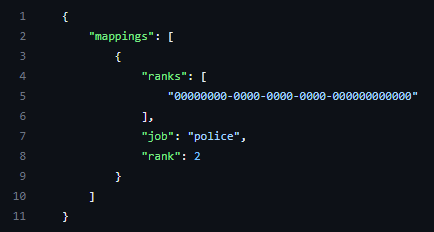
Locate the whitelist module within your `[sonorancms]/sonorancms/server/modules` and open the `jobsync_config.json` file

<figure><img src="https://3006847189-files.gitbook.io/~/files/v0/b/gitbook-x-prod.appspot.com/o/spaces%2F-MdBOa9OFjtdqw9FdXli%2Fuploads%2Fgit-blob-651bb02f37371448226155c7d9b6ee1a41205496%2FCMS_JobSyncConfig.png?alt=media" alt=""><figcaption><p>Sonoran CMS - In-Game Integration - JobSync Config</p></figcaption></figure>

### 2. Set Rank Mappings for Job Sync

| Config Option | Description                                                            |
| ------------- | ---------------------------------------------------------------------- |
| rank\_mapping | \["9dd1fea1-2360-4be2-923b-71b0c87944d0"] = {job = 'police', rank = 2} |

Here you must follow the format shown above to specify rank mappings, the first value ("ranks") is the Rank UUID, followed by what job and rank you would like to set it to. To find the UUID for a given Rank, follow the instructions below.

## Getting Rank UUIDs

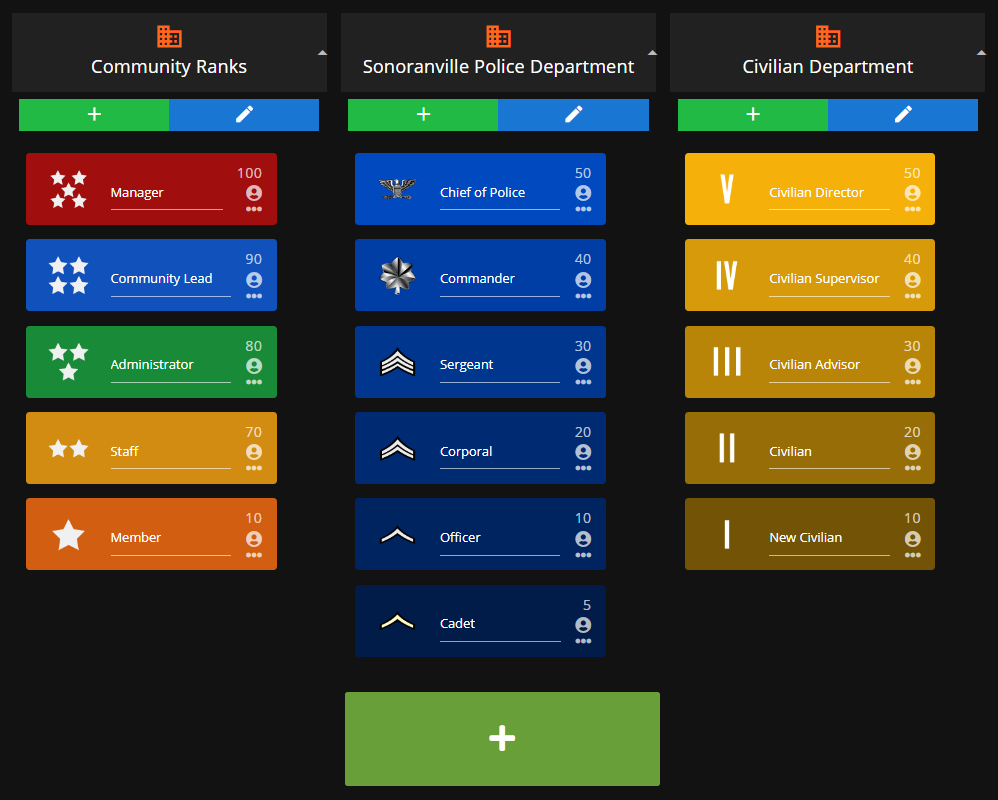
### 1. Open Department Configuration Page

![Sonoran CMS - Departments & Ranks](https://3006847189-files.gitbook.io/~/files/v0/b/gitbook-x-prod.appspot.com/o/spaces%2F-MdBOa9OFjtdqw9FdXli%2Fuploads%2Fgit-blob-f3122c32d76640bfa148f67ad67b0cfb8c252256%2FCMS_DeptRankOverview2.png?alt=media)

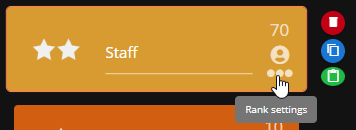
### 2. Open "Rank Settings" Menu

![Sonoran CMS - Open Rank Settings Menu](https://3006847189-files.gitbook.io/~/files/v0/b/gitbook-x-prod.appspot.com/o/spaces%2F-MdBOa9OFjtdqw9FdXli%2Fuploads%2Fgit-blob-de770ba2548b449b7b7be5bc61bdae848ae2e171%2FCMS_RankSettings.png?alt=media)

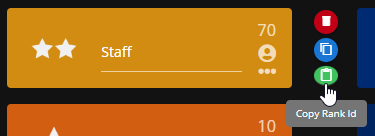
### 3. Select "Copy Rank ID"

![Sonoran CMS - Copy Rank ID](https://3006847189-files.gitbook.io/~/files/v0/b/gitbook-x-prod.appspot.com/o/spaces%2F-MdBOa9OFjtdqw9FdXli%2Fuploads%2Fgit-blob-b03cf3b9c57945306f302a66cd77534ef51593fd%2FCMS_CopyRankId.png?alt=media)