# Whitelist

{% hint style="info" %}
All players of your server must have their [API ID](/cms/developer-api-documentation/api-integration/getting-started/api-id-system.md) setup and must be given a rank that has whitelist permissions for the specified server.
{% endhint %}

{% hint style="success" %}
Looking for VPS, web, or dedicated hosting? Check out our official [server hosting](https://github.com/Sonoran-Software/SonoranCMS-Documentation/blob/master/integration-capabilities/in-game-integration-resources/roblox-integrations/available-resources/broken-reference/README.md)!
{% endhint %}

This resource is a whitelist system that utilizes Sonoran CMS's game whitelist system by checking against that whitelist upon each player connection.

{% embed url="<https://www.youtube.com/watch?v=4PAtKYQokXE>" %}

## Installation

### 1. Download the Resource

You can download/copy the script from [here](https://github.com/Sonoran-Software/Sonoran-CMS-Roblox-Integration/blob/release/script.lua). If you plan to copy and paste I recommend viewing the raw version.

### 2. Install the Resource

Follow the standard resource installation guide for the whitelist resource, available [here](/cms/integration-capabilities/in-game-integration-resources/roblox-integrations/roblox-resource-installation.md).

### 3. Setup Whitelist Permissions

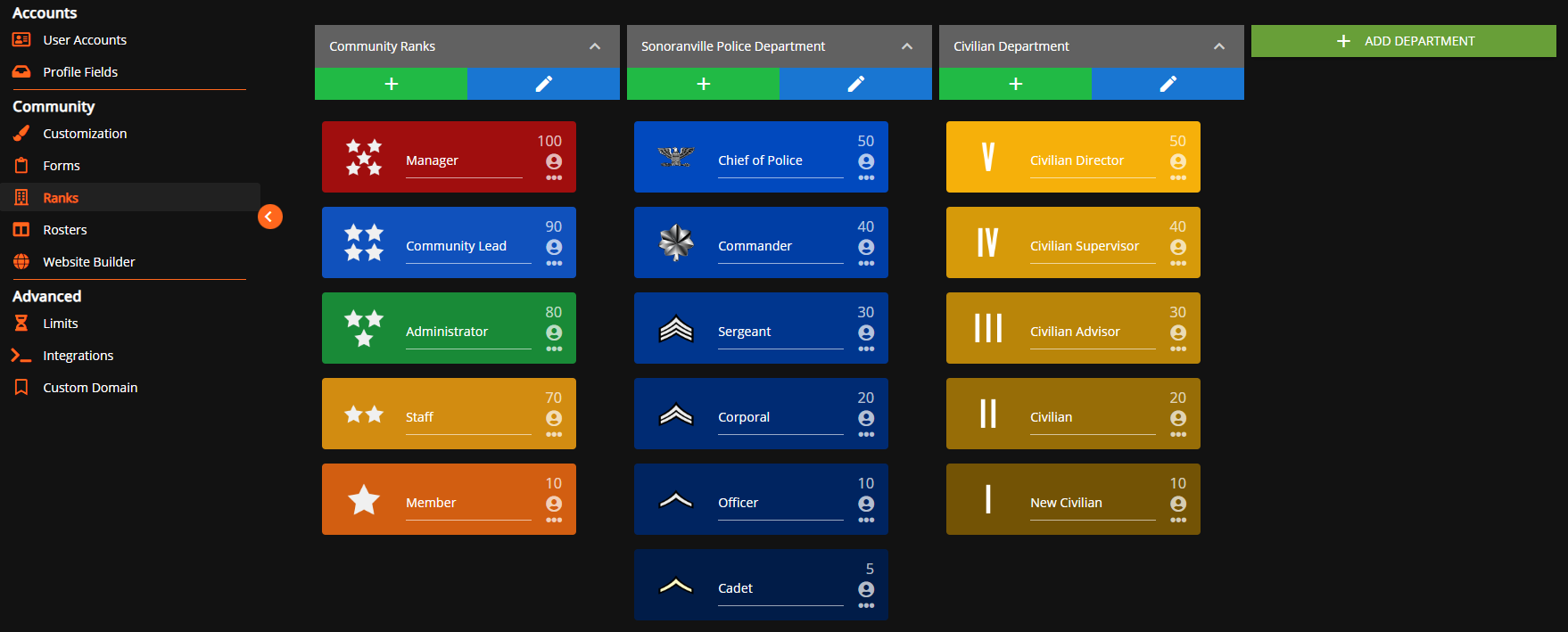
Navigate to the Rank Manager within the Administrative Panel.

`Administrative Panel` > `Ranks`

![Sonoran CMS - Departments & Ranks](/files/2Bh9gEMGIsmoW5pxaoP7)

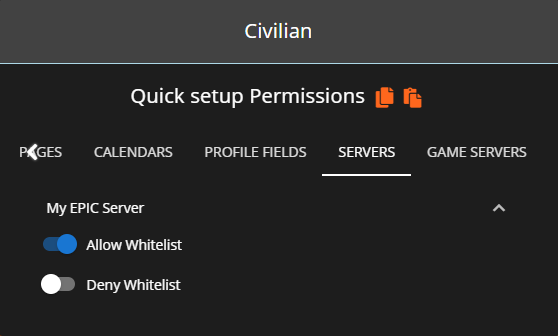
For users in your Sonoran CMS community to be accepted through the whitelist, they'll need to be granted permission for the whitelist through rank permissions. You will need to grant each rank the permission of **Allow Whitelist** that you want to be allowed through the whitelist. You will want to grant each rank with the permission of **Block Whitelist** if you want them to be blocked from passing through the whitelist.
{% hint style="warning" %}
**Block Whitelist** will ALWAYS overrule **Allow Whitelist**\
\
If a user is granted both **Block Whitelist** and **Allow Whitelist** through various ranks they will be blocked from the whitelist. Block will always overrule allow.
{% endhint %}

![Sonoran CMS - Rank Manager Server Permissions](/files/SHZdPyFXc5AUg9QttzJi)

### 4. Add your API ID

Ensure all players have added their [API ID](/cms/developer-api-documentation/api-integration/getting-started/api-id-system.md) to the CMS!

## Configuration

The top section of the script has various configuration values to set, below is a table explaining those values.

| Value Name  | Description                                                                                    | Default                                 |
| ----------- | ---------------------------------------------------------------------------------------------- | --------------------------------------- |
| ServerID    | This is the game server ID set in the CMS management panel.                                    | `1`                                     |
| CommunityID | This is the community ID that is found in the API Integration section of the management panel. | `"REPLACE_THIS"` (This must be changed) |
| APIKey      | This is the API key listed in the API Integration section of the management panel.             | `"REPLACE_THIS"` (This must be changed) |


---

# Agent Instructions: Querying This Documentation

If you need additional information that is not directly available in this page, you can query the documentation dynamically by asking a question.

Perform an HTTP GET request on the current page URL with the `ask` query parameter:

```
GET https://docs.sonoransoftware.com/cms/integration-capabilities/in-game-integration-resources/roblox-integrations/available-resources/whitelist.md?ask=<question>
```

The question should be specific, self-contained, and written in natural language.
The response will contain a direct answer to the question and relevant excerpts and sources from the documentation.

Use this mechanism when the answer is not explicitly present in the current page, you need clarification or additional context, or you want to retrieve related documentation sections.