

ESX v2 is not supported by this submodule and will not function. Only ESX v1 is supported.
Looking for FiveM hosting? View our current hosting offer.
Activation Guide
- Download and Install the Core
If you haven’t already, be sure to install and configure the SonoranCAD Core first.
- Activate the Submodule and all Dependencies
Follow the submodule activation guide for the callcommands, locations, and postals submodules.
- [Optional] Add your Game Server IP and Port
This step is only required if you wish to use the automatic fine capability.
Be sure to have your game server IP and port set in the admin panel under Advanced > In-Game Integration > Server Events and Integrated Live Map
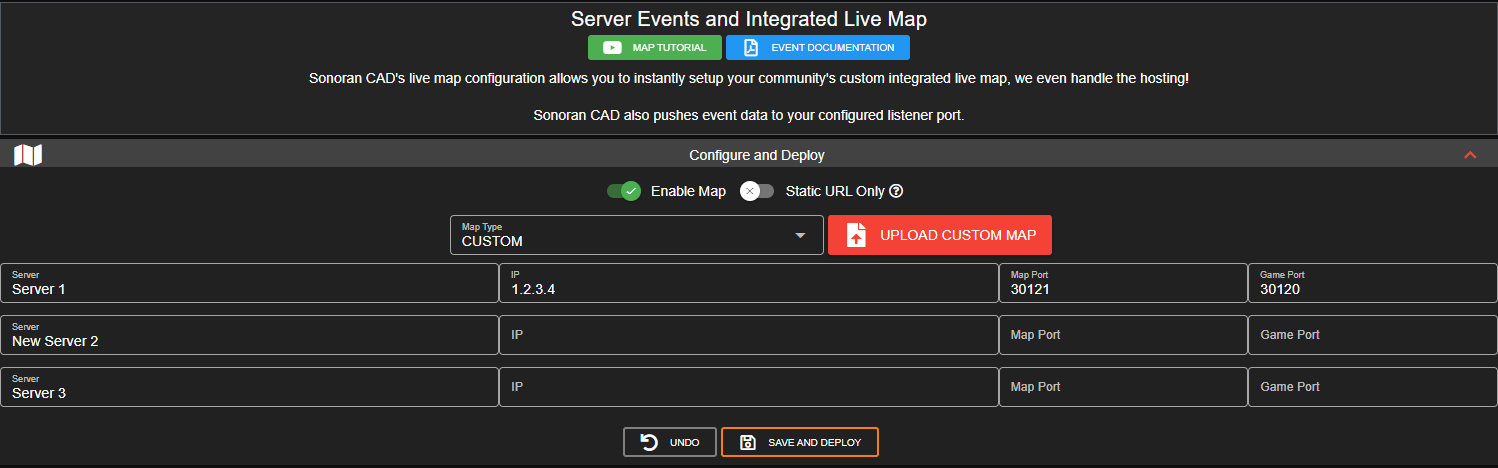
- Set Your API ID
Don’t forget to set your account API ID to properly link your in-game user to the CAD.
- Configuration
Review the config_esxsupport.lua file to configure the submodule to behave how you like. The file is well documented. Please review all the settings!
Auto-Fines
Civilians in-game can be automatically billed with esx_billing. To do so, simply enableissueFines in the config and add a list of custom record types to the fineableForms array. Also, be sure that you have configured your server IP and port in the admin menu.
Ex: fineableForms = {"Arrest Report", "Speeding Citation"}
The fines are pulled from your custom record’s:
Chargessection ->FinefieldSpeedsection ->Finefield
Usage
This submodule can be used to issue fines to players when reports/records are entered into the CAD that include fines. You can configure the reports/records that are finable in the configuration. This submodule also adds support for ESX that other submodules can take advantage of. Currently, the following submodules are supported:- dispatchnotify
- Adds the ability to show character names in dispatch responses (officer names)
- Adds the ability to restrict functionality to certain jobs (like police). See the dispatchnotify documentation for how to do this.
- callcommands
- Adds the ability to show character names for the caller when they use /911. This is automatic when the submodule is installed.
- livemap
- Adds the ability to show character names on the map.
Legacy ESX Support
This is mainly for ESX v1 releases that were made before the character system implementation using only theusers database table. These versions of ESX used the users table only for player information of active characters and a characters table that held all character information (active and secondary characters of your players).
Due to different handling of character information such as first name and last names, this option allows you to use esxsupport submodule with older “Legacy” ESX v1 releases.
Simply set legacyESX to true in your config_esxsupport.lua