# Quick Links

{% hint style="warning" %}
Community customization is not included with the free version.\
For more information, see our [pricing](https://docs.sonoransoftware.com/cad/pricing/faq) or view how to check your community [limits](https://docs.sonoransoftware.com/cad/tutorials/getting-started/view-your-limits).
{% endhint %}

### Adding Quick Links

In the admin customization menu, expand the Quick Links section:

#### 1. Add, edit and remove quick links by specifying the label, link, and color code.

![Sonoran CAD's quick link customization panel](https://232668649-files.gitbook.io/~/files/v0/b/gitbook-legacy-files/o/assets%2F-M4pGN81fb4R6zFhodcu%2F-MAEBZCrNTTPUeyPNanR%2F-MAEIEb1X8F9K8oq7roK%2Fimage.png?alt=media\&token=4ac2cc09-5855-42fb-9b89-ba73360519c1)

#### 2. Be sure to press SAVE

![Save Quick Links](https://232668649-files.gitbook.io/~/files/v0/b/gitbook-legacy-files/o/assets%2F-M4pGN81fb4R6zFhodcu%2F-MAEBZCrNTTPUeyPNanR%2F-MAEIbxcYJmQYHFLsR-y%2Fimage.png?alt=media\&token=92937aae-ac9d-4eb9-9627-d6015a1b2494)

### Viewing Quick Links

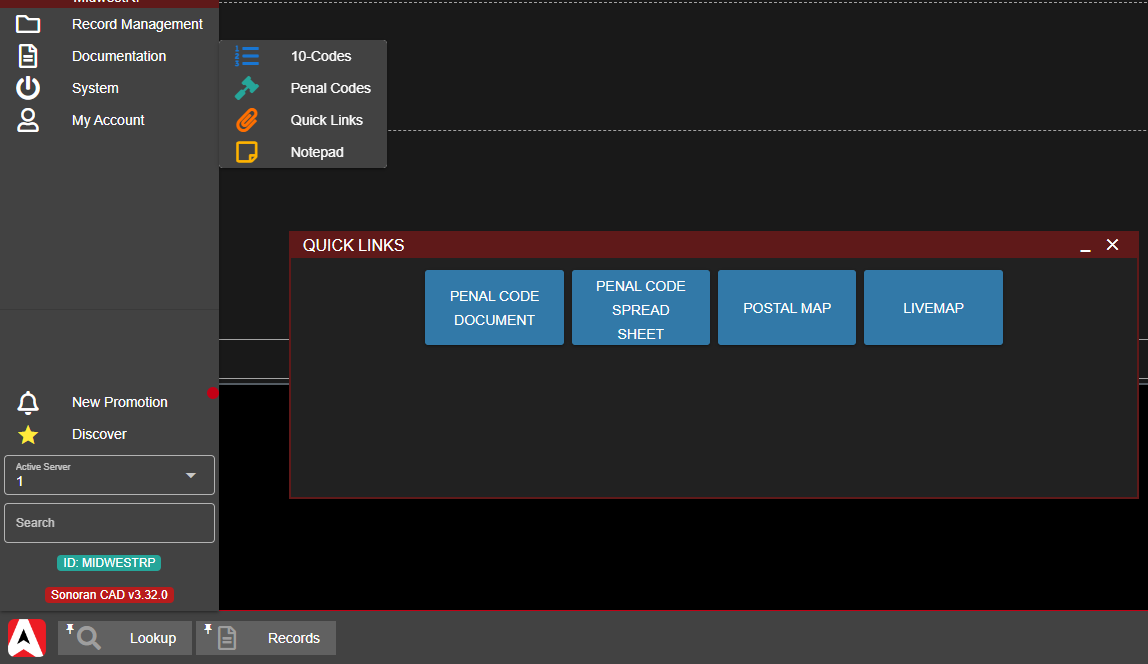
Quick links can be found in the taskbar under Documentation > Quick Links

Or via the taskbar search and [pinning](https://docs.sonoransoftware.com/cad/tutorials/customizing-your-layout#7.-tab-system) system.

<figure><img src="https://232668649-files.gitbook.io/~/files/v0/b/gitbook-x-prod.appspot.com/o/spaces%2F-M4pGN81fb4R6zFhodcu%2Fuploads%2FnpmHyUlYzsgYJV8RmuzQ%2Fimage.png?alt=media&#x26;token=b5bfff03-7930-4975-b6b0-a1d1ac12f120" alt=""><figcaption><p>Sonoran CAD - Quick Links Page</p></figcaption></figure>