# Community Branding and Settings

### Community Information

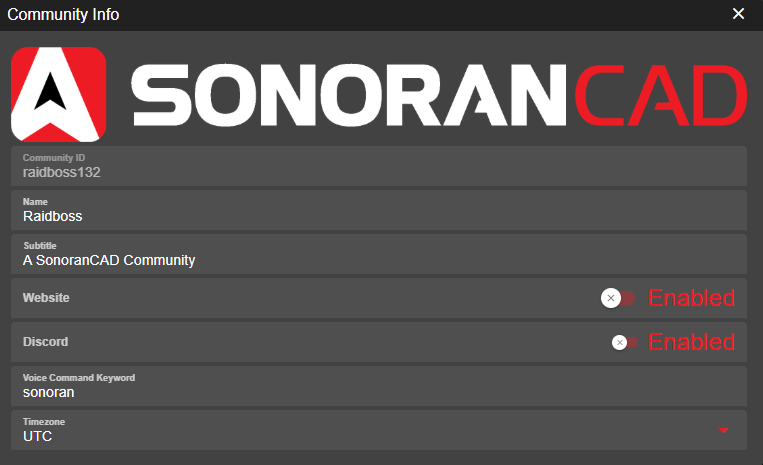
The admin customization info section allows you to customize your community's image, name, time zone, and more!

<figure><img src="https://232668649-files.gitbook.io/~/files/v0/b/gitbook-x-prod.appspot.com/o/spaces%2F-M4pGN81fb4R6zFhodcu%2Fuploads%2Fznrwg731XSVOjGB1NbBF%2Fimage.png?alt=media&#x26;token=05c3d06a-5659-4e74-a559-2e835788a886" alt=""><figcaption></figcaption></figure>

| Field                 | Description                                                                                                                                                      |
| --------------------- | ---------------------------------------------------------------------------------------------------------------------------------------------------------------- |
| Image                 | Click the image at the top and upload the image to the CAD.                                                                                                      |
| Name                  | <p>This is your community's name.</p><p>This will be displayed on your custom login page, community card, and top header.</p>                                    |
| Subtitle              | This is the text displayed below your community name on your custom login page and community card.                                                               |
| Website               | This is a link to your community website, to be displayed in the community menu.                                                                                 |
| Discord               | This is a link to your community Discord, to be displayed in the community menu.                                                                                 |
| Voice Command Keyword | This allows you to change the default [voice command](https://docs.sonoransoftware.com/cad/tutorials/other-features/voice-commands) keyword to something custom. |
| Timezone              | All users in the CAD will have the clock at the top of the screen synced to this timezone. This helps avoid confusion, and improves report consistency.          |

### Community ID

{% hint style="warning" %}
Custom community IDs require the **starter** version of Sonoran CAD or higher.\
For more information, see our [pricing](https://sonorancad.com/app/#/pricing) or view how to check your community [limits](https://docs.sonoransoftware.com/cad/tutorials/getting-started/view-your-limits).
{% endhint %}

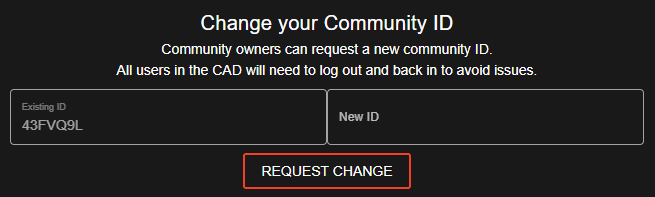
Looking to change your community ID?\
Navigate to `Admin` > `Advanced` > `Change Community ID`

![Sonoran CAD's Community ID Change](https://232668649-files.gitbook.io/~/files/v0/b/gitbook-x-prod.appspot.com/o/spaces%2F-M4pGN81fb4R6zFhodcu%2Fuploads%2FeDneVhRXolF1IwhWO2JO%2FCAD_ChangeCommId.png?alt=media\&token=1ede0a52-b483-424f-823e-9b84188f13d2)

Here, you can enter in and request a new community ID.\
Once submitted, you will be logged out. All active community members will also need to log out and back in to avoid any issues.

{% hint style="danger" %}
If your community has an active subscription, you will automatically be downgraded to the free version.

To transfer the subscription to the new community ID, update your community ID by pressing "Modify" on the active subscription in the [payment center](https://docs.sonoransoftware.com/cad/pricing/faq/accessing-the-payment-center).
{% endhint %}