

 FivePD integration - illustrative promotional artwork
FivePD is listed with the FiveM submodules for discovery, but is installed as a separate resource and a FivePD plugin DLL. It is not bundled with Sonoran CAD and does not go in
FivePD integration - illustrative promotional artwork
FivePD is listed with the FiveM submodules for discovery, but is installed as a separate resource and a FivePD plugin DLL. It is not bundled with Sonoran CAD and does not go in sonorancad/submodules/.
Features
NPC imports include civilian information, available driver/hunting/weapon licenses, and warrant text. Vehicle imports include plate, owner, model, color, and registration status. NPC portraits are not imported.
Installation
- Download the Integration
Download sonoran_fivepd.zip from the latest release. Use the installation ZIP, not GitHub’s source-code download. The DLL is already compiled.
- Copy the Two Components
- Review the Configuration
Open sonoran_fivepd/config.lua. Automatic callout imports and civilian, vehicle, license, and warrant records are enabled by default. The mappings match CAD’s default record templates; customized communities should check Record Mappings.
- Set the Start Order
In server.cfg:
- Link In-Game
Restart the server and reconnect. Go on duty in CAD and FivePD, then accept a callout or make a traffic stop.
Units must link their CAD account in-game with the /link command.
Configuration
Record Mappings
Default record type IDs are civilian7, vehicle 5, license 4, and warrant 2.
- In CAD’s Admin area, open Custom Records and select a template. The number beside its name is its
recordTypeId. - Click the destination field, then open Advanced -> Mapping -> Field Mapping ID in the field settings panel. Scroll the panel if necessary.
- Copy that ID into the corresponding key in
records.<category>.fieldsinconfig.lua. Keep the right-hand FivePD field name or mapping function. ChangerecordTypeIdif your template uses a different number. - Restart
sonoran_fivepd.
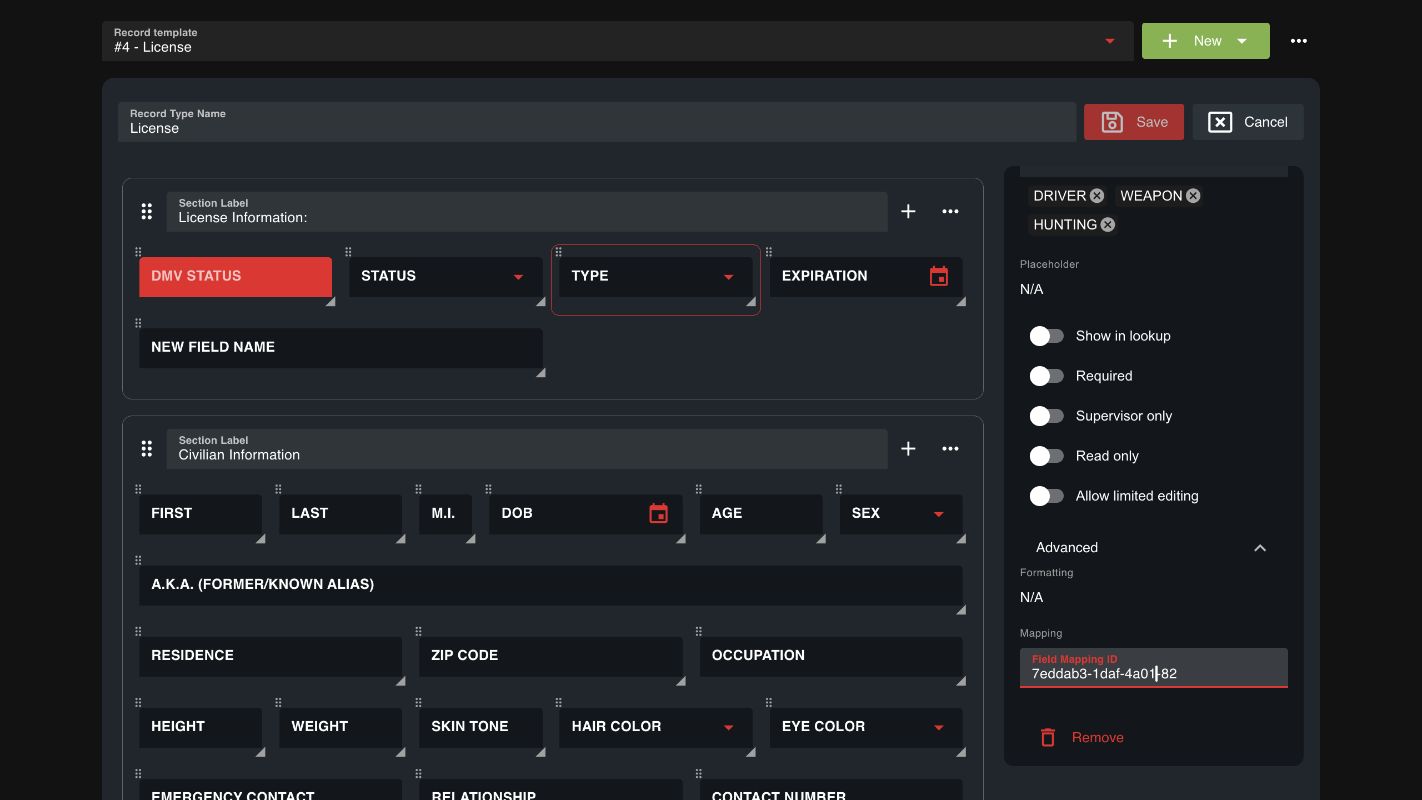 Copy the field’s mapping ID into the plugin configuration. Example uses default templates, not player data.
Copy IDs exactly. The supplied license
Copy the field’s mapping ID into the plugin configuration. Example uses default templates, not player data.
Copy IDs exactly. The supplied license fieldAliases handles default IDs. Replace the IDs as needed for custom fields. Dropdown values must also match your template’s options.
Fishing licenses are not in CAD’s default license Type dropdown. Add FISHING to that dropdown and Fishing = 'FISHING' to records.license.types to import them. Dates are copied from FivePD; use a mapping function if your CAD template requires a different format.
For communities using database sync, enable Include CAD API records in DB Sync lookups, described under Combine API and DB Sync Records in the database sync guide, so imported FivePD records can appear alongside external database results.
Limitations and Troubleshooting
- Automatic discovery depends on the callout. Entities must exist and be networked on the officer’s client. Custom callouts that hide entities inside helper objects, static fields, or computed properties may need the fallback commands:
/fivepdcadpedfor the nearest NPC within 5 metres, or/fivepdcadvehiclefor the nearest vehicle within 15 metres. - No world-wide scanning. Only accepted callouts and the encounter triggers above are imported. Merely generating or offering a callout does not create a CAD call. This integration does not create FivePD callouts from CAD or sync CAD edits back into FivePD.
- Completion adds a note; it does not close the CAD call. Dispatch manages the call’s status. Service notes do not dispatch CAD units.