# Vehicle Register (VehReg)

<figure><img src="/files/YfLhCSE8ajQKRf7fws3U" alt=""><figcaption></figcaption></figure>

## Activation Guide

### 1. Download and Install the Resource

{% hint style="info" %}
This submodule is already **enabled by default** when installing the [Sonoran CAD FiveM resource](/cad/integration-plugins/in-game-integration/fivem-installation.md).
{% endhint %}

### 2. Adjust the Configuration

The bodycam settings are stored inside of the `/configuration/vehreg_config.lua` file.

<details>

<summary><code>vehreg_config.lua</code></summary>

<table><thead><tr><th>Option</th><th width="276">Description</th><th width="351">Default</th></tr></thead><tbody><tr><td>reigsterCommand</td><td>The command used to register current vehicle</td><td>reg</td></tr><tr><td>defaultRegExpire</td><td>The default date that all registrations will expire</td><td>01/02/2030</td></tr><tr><td>defaultRegStatus</td><td>The default status that all registrations will have | MUST BE IN CAPS</td><td>VALID</td></tr><tr><td>language</td><td>Array of language used within the script</td><td>English</td></tr><tr><td>recordData</td><td>Array of field UID's based on your vehicle registration record</td><td>Default from CAD</td></tr><tr><td>customData</td><td>Array of preset vehicle information, commonly used for addon vehicles where names may not be present</td><td><pre class="language-lua"><code class="lang-lua">customData = {
    {
        spawncode = "adder",
        model = "Adder",
    },
    {
        spawncode = "blista",
        model = "Blista",
    }
}
</code></pre></td></tr></tbody></table>

</details>

### 3. Ensure Players are Linked

Ensure the player has already [linked their CAD](/cad/integration-plugins/in-game-integration/link-user-in-game.md) for this integration to work.

### 4. Configure Custom Record Fields

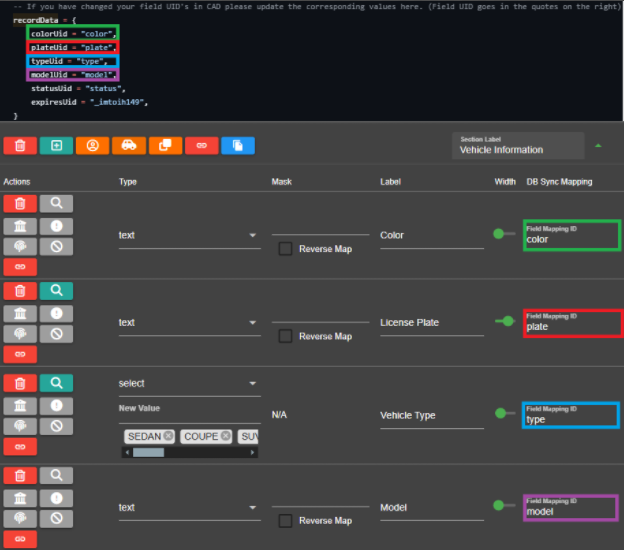
When a player registers a vehicle in-game, the submodule must know what fields in your custom vehicle registration to enter the vehicle information into. The `recordData` portion of the config contains the `Field Mapping ID` for the default vehicle record template.

Custom record templates are found in `Admin` > `Customization` > `Custom Records`

If you have modified the [vehicle registration template](/cad/tutorials/customization/creating-custom-record-and-report-types.md), update the `recordData` configuration accordingly.

<figure><img src="/files/ULZllse0GNNHSAaJj9QJ" alt=""><figcaption><p>Vehreg: Custom Record Field Mapping</p></figcaption></figure>

## Commands

In-game commands can be used to

* `/reg` Registers the vehicle you are currently sitting inside to your currently selected CAD character

<figure><img src="/files/39xnG2CaAggJkpCXR3Fy" alt=""><figcaption></figcaption></figure>

## Developer Documentation

You can now implement our vehicle registration system into your own scripts by simply calling a server event! See our [Server Events documentation](/cad/integration-plugins/in-game-integration/framework-development-documentation/server-events.md#sonorancad-registervehicle) for usage.


---

# Agent Instructions: Querying This Documentation

If you need additional information that is not directly available in this page, you can query the documentation dynamically by asking a question.

Perform an HTTP GET request on the current page URL with the `ask` query parameter:

```
GET https://docs.sonoransoftware.com/cad/integration-plugins/in-game-integration/available-plugins/vehreg.md?ask=<question>
```

The question should be specific, self-contained, and written in natural language.
The response will contain a direct answer to the question and relevant excerpts and sources from the documentation.

Use this mechanism when the answer is not explicitly present in the current page, you need clarification or additional context, or you want to retrieve related documentation sections.